Security and Compliance
Review controls, run scans, and export security checklists
Table of Contents
About this guide
Edge provides local deployment and security administration features. Your organization’s authorization, configuration, and operating procedures determine which data and workloads may run on a particular installation.
Cloud service authorizations do not automatically apply to a separately operated Edge environment. Confirm the deployment’s approved security boundary, data handling rules, and remaining customer responsibilities with your security team.
Operational responsibilities
| Area | Administrator responsibility |
|---|---|
| Access | Assign named accounts and appropriate roles; protect physical and management access. |
| Model use | Approve local models and decide whether any data may be sent to a cloud provider. |
| Credentials | Protect provider keys, recovery material, certificates, and administrator credentials; plan rotation. |
| Software | Apply approved release, component, and OS updates through the site’s maintenance process. |
| Storage and recovery | Verify the actual encryption configuration, retention policy, backups, and restore procedure. |
| Audit and evidence | Review relevant events and findings; retain exports according to the site’s policy. |
Do not assume that disk encryption, a particular FIPS configuration, or a specific STIG result is identical across hardware platforms. Use the evidence supplied for the installed appliance and validate changes with the deployment team.
Run a compliance scan
In the Appliance Manager, use an admin account for scan and disposition changes.
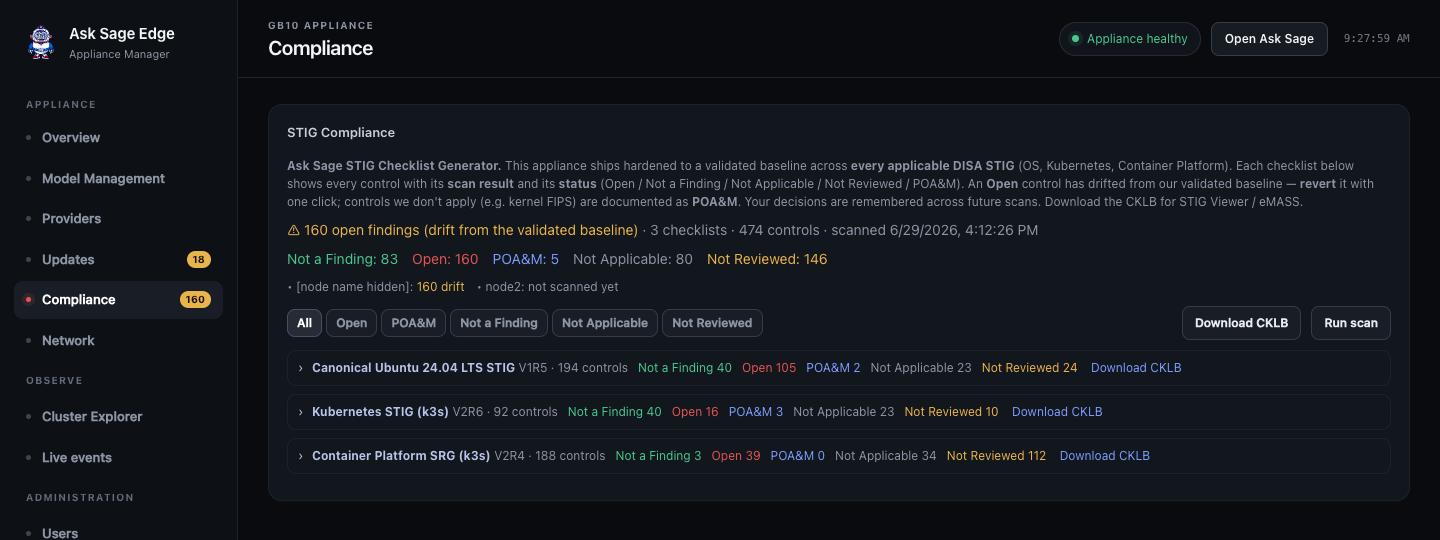
- Open Compliance and review the last scan time and node coverage.
- Select Run scan and wait for completion.
- Review the available checklists and each node’s results. The applicable checklists depend on the installed package.
- Filter by status to investigate open findings and controls requiring review.
- Open a control to read its result and recorded decision before changing its status.
The appliance can run installed scan content locally. Freshness of the benchmark and coverage of all expected nodes still matter when assessing a result.
Interpret checklist statuses
| Status | How to use it |
|---|---|
| Open | A finding needs investigation or remediation. |
| Not a Finding | The control is recorded as satisfied for the assessed configuration. |
| Not Applicable | A documented applicability decision excludes the control. |
| Not Reviewed | Review or sufficient evidence is still needed. |
| POA&M | A finding or required action is tracked in a Plan of Action and Milestones. |
The scan result and an operator’s recorded disposition are different pieces of evidence. Enter accurate justifications and keep the underlying finding visible to the security review process.
Where the Manager offers Revert for a supported drifted setting, review what it will restore and coordinate the change. That control restores a defined baseline value; it is not a universal remediation button for every finding. Re-scan after remediation and confirm the affected services still work.
Export evidence
Use Download CKLB for the available checklist or export. Review it in the approved STIG tooling and associate it with the appliance, node, scan date, and release assessed. Transfer the file through your organization’s approved process.
A scan summary alone is not an authorization decision. Manual controls, inherited controls, exceptions, and deployment-specific settings still require the responsible security team’s review.