Ask Sage Tokens
One token system, every model. The unit you spend on chat, agents, datasets, and Workbooks.
Table of Contents
Tokens at a Glance
In generative AI, a token is a unit of text the model processes — roughly a short word, a piece of a longer word, or a punctuation mark. Models charge by the token, both for what you send (the prompt) and what they send back (the response).
Most platforms expose the underlying provider's token meter directly, which means switching models also switches the units, the rates, and the math. Ask Sage tokens are different: they're a model-agnostic currency. You spend Ask Sage tokens regardless of which underlying model handles the prompt — flagship, standard, lightweight, reasoning, CUI, Non-CUI — and the platform handles the conversion to provider tokens behind the scenes.
That means one balance to watch, one set of refill mechanics, and one mental model that doesn't break when you switch models in Model Compare or pin a different default for a workflow.
How Tokens Are Counted
Every interaction with a model consumes tokens for both halves of the exchange: the prompt you send and the response you get back. If your prompt is 12 tokens and the response is 180 tokens, the interaction cost 192 tokens.
Three things to keep in mind:
- Cost varies by model. Flagship models cost more per token than standard or lightweight tiers. The same prompt sent to two models will spend different numbers of Ask Sage tokens.
- Prompt and response can be priced differently. For most models, output (response) tokens are more expensive than input (prompt) tokens. A short prompt with a long response can cost more than a long prompt with a short response.
- Conversation history is included. In a multi-turn chat, prior turns are sent with each new prompt as context. Long conversations cost more per turn than short ones, even if your latest message is brief. The Conversation Context panel shows how much history is riding along on each send.
Inference Tokens
Inference tokens are consumed any time a model produces a response. That covers most of what you'll do day-to-day on the platform.
Things that spend inference tokens:
- Chat — every message you send and every response the model returns.
- Personas — the system prompt counts as part of the input on every turn, so heavier personas cost more per message than lighter ones.
- Datasets (RAG retrieval) — when a Dataset is attached, retrieved chunks are added to the prompt as context. Bigger retrievals mean bigger prompts.
- Workbook actions — once data is in a Workbook, asking questions or running operations against it spends inference tokens (the ingestion itself is a training-token cost — see below).
- Model Compare — both panes consume inference tokens on every send.
- Code Canvas — generating code, running Quick Actions, and chat turns inside a canvas all spend inference tokens.
- MCP Tools and Deep Agent — agentic workflows can chain multiple model calls per user turn, so a single instruction may spend more tokens than a normal chat.
Training Tokens
Training tokens are consumed when content is processed into a vector database — embedded, indexed, and stored so that future prompts can retrieve from it. This is a one-time cost per piece of ingested content; you pay it when the data goes in, not when you query it later.
Things that spend training tokens:
- Dataset ingestion — uploading files, pasting text, or pointing to a source for inclusion in a Dataset. Each chunk gets embedded and stored.
- Workbook ingestion — same mechanic as Datasets, applied to the documents that ground a Workbook's bound conversation.
The reason training tokens are billed separately is that ingestion is a different operation from inference. It uses embedding models rather than generative models, runs at a different cost basis, and only happens when data changes — not on every prompt.
Where to See Your Usage
Token balances live in the platform's Settings → Usage & Billing panel. The path is the same on every screen.
Step 1. Click your avatar in the bottom-left corner of the left rail to open the user menu, then select Settings.
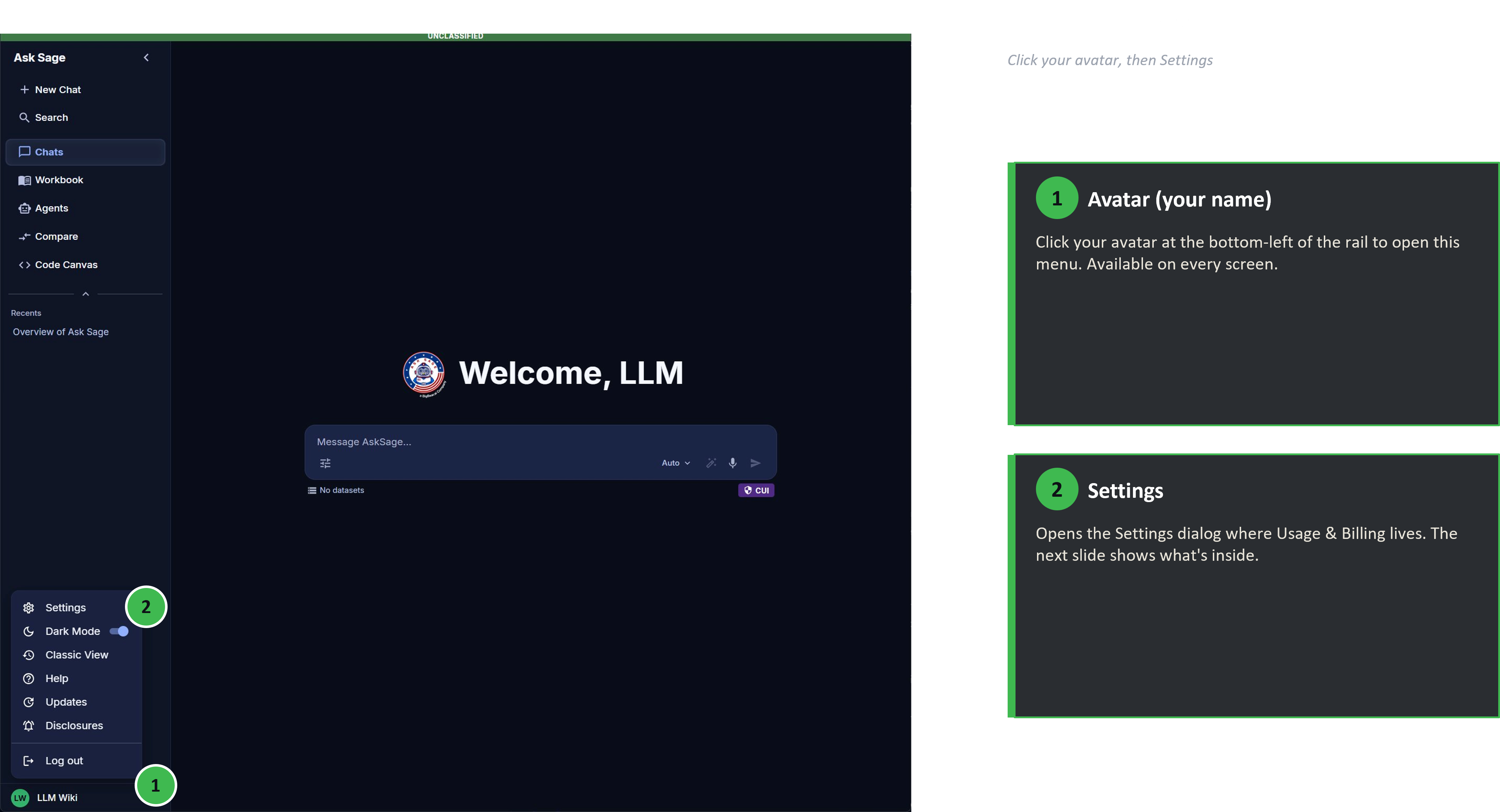
User menu — Settings, Dark Mode, Classic View, Help, Updates, Disclosures, Log out
Step 2. In the Settings dialog, choose Usage & Billing from the left-hand tabs.
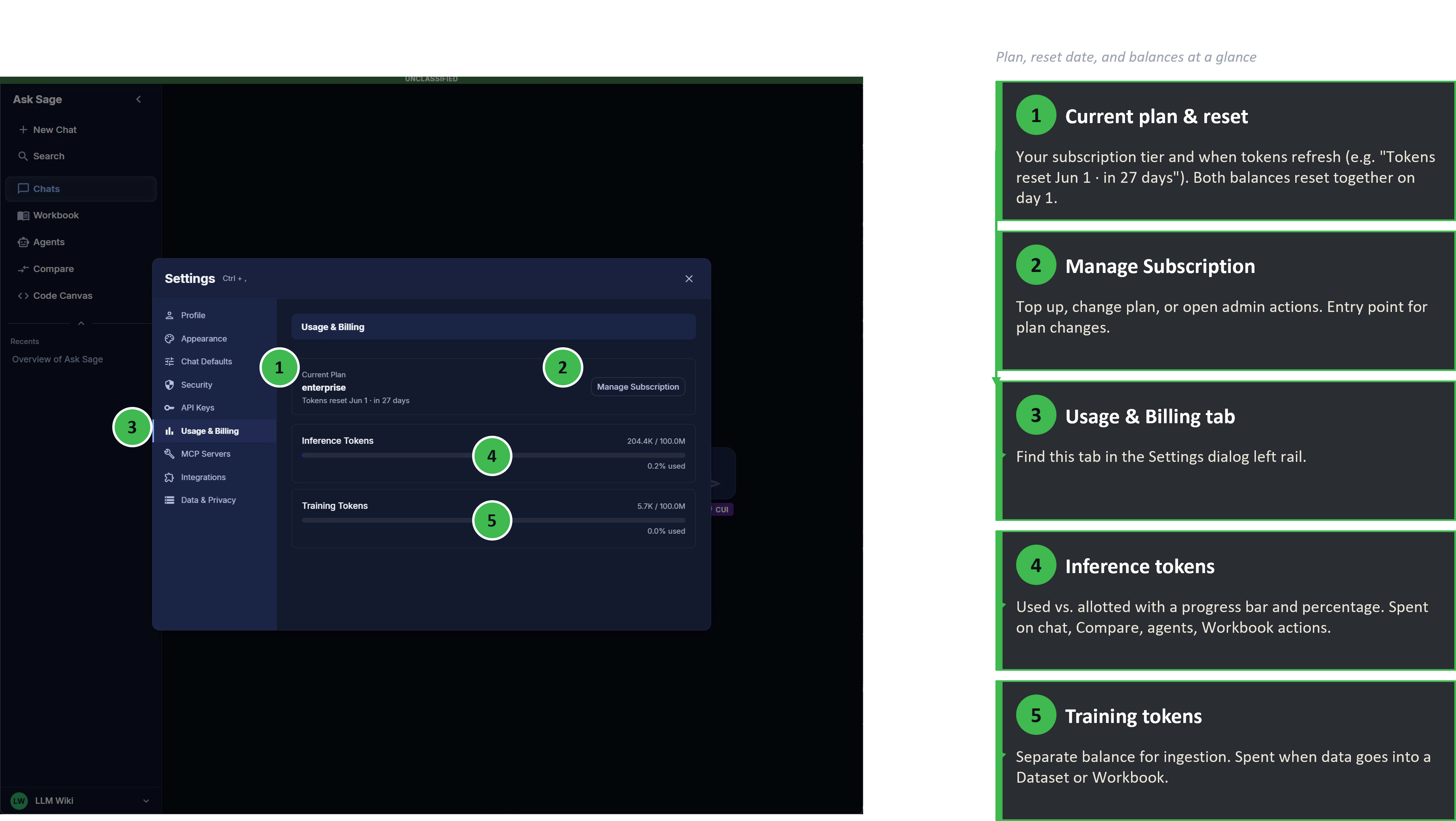
Usage & Billing — current plan, monthly reset date, inference and training balances with progress bars
The panel surfaces four things at a glance:
- Current plan — your subscription tier (e.g. Enterprise, individual plan name).
- Reset date — when this month's allotment refreshes (e.g. "Tokens reset Jun 1 · in 27 days"). Both balances reset together. The reset happens at 00:00 UTC, which may land earlier or later than midnight in your local timezone.
- Inference Tokens — used vs. allotted, with a percentage and progress bar.
- Training Tokens — same display, separate balance.
The Manage Subscription button on this panel is the entry point for plan changes, refills, and Enterprise admin actions — see the next section.
Managing & Refilling Tokens
Once you can see your balances in Settings → Usage & Billing, three operational paths cover most situations:
Compare plans or pricing
See Sales/Cost for tiers, pricing, and bulk options.
For step-by-step instructions on subscription changes inside the platform, see Subscription Management.
Gotchas
- No rollover. Unused tokens at month-end are forfeit. If you're consistently leaving tokens on the table, you're on a higher plan than you need; if you're consistently running out, you're on a lower one.
- Compare doubles your spend. Every prompt in Model Compare goes to two models. Useful for decisions, expensive as a daily driver.
- Flagship models cost meaningfully more per token. A "what's the capital of France" answered by a flagship reasoning model is wasteful. Match the model tier to the difficulty of the work.
- Long conversations grow expensive. Every turn in a chat sends the prior history along as context. A 50-turn chat costs more per send than a fresh one. Start a new chat when the topic shifts — check the Conversation Context panel to see how full the window has gotten.
- RAG retrievals add to the prompt. Datasets and Workbooks pull in retrieved chunks on every query. Big retrievals are useful but not free.
- Agentic flows can fan out. One prompt to a Deep Agent or MCP-enabled chat can become many internal model calls. Inspect what the agent is doing if your spend looks higher than expected.
- Workbook ingestion is a one-time training-token cost; querying is ongoing inference. Don't confuse the two when forecasting a Workbook's lifetime cost.
- Persona length is a per-message tax. A multi-paragraph persona ships with every prompt. Trim what you don't need.