API & Integration
Execute Agent Builder workflows programmatically with the Ask Sage API
Table of Contents
- Executing Agents via API — The /execute-agent endpoint
- Multi-File Monthly Comparison — Compare facility financials across February and March with a batch script
- Input Data — February & March facility datasets
- Python Implementation — Complete working script
- Enriched Output — Per-row analysis for each month
- Cross-Month Comparison — Trend analysis and portfolio summary
Any workflow you build in Agent Builder can be triggered programmatically using the POST /execute-agent endpoint. Pass your agent's ID, a message, optional input variables, and optional conversation history — and get back the full execution result.
For full endpoint details — including request parameters, response schema, authentication, and streaming options — see the Ask Sage API Reference.
This example uses the CSV Data Query agent to compare facility financial data across two months — February and March. A Python script calls /execute-agent for each month's CSV, enriches every row with AI-generated analysis, then runs a third call that compares the results and produces a portfolio-level trend summary.
/execute-agent with the February CSV. The agent loops through every row, calculates financial metrics, and appends a written analysis per facility. conversation_history. The agent calculates month-over-month deltas, identifies trends, and produces a portfolio summary. 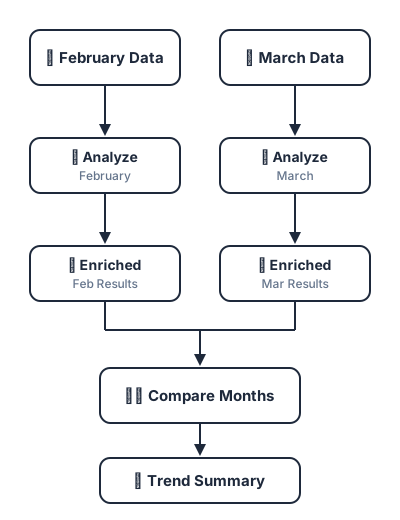
Input Data
Two CSV files with identical structure — one per month. Each row represents a facility with budget, obligation, expenditure, staffing, and service volume data. Download the sample datasets below and try it yourself — import the CSV Data Query template into Agent Builder, then run the script against your own Ask Sage account.
February
| Facility Name | Region | Monthly Budget | Obligations | Expenditures | Unliquidated | Unobligated Bal. | FTEs Onboard | Outsourced Svc. | Direct Svc. Vol. |
|---|---|---|---|---|---|---|---|---|---|
| Aurora Medical Center | Southwest | 16,700,000 | 15,200,000 | 13,800,000 | 1,400,000 | 1,500,000 | 1,380 | 1,800 | 34,200 |
| Bayside Health Complex | Southeast | 10,800,000 | 9,700,000 | 8,900,000 | 800,000 | 1,100,000 | 1,005 | 1,250 | 23,800 |
| Bravo Regional Hospital | West | 16,700,000 | 15,800,000 | 14,500,000 | 1,300,000 | 900,000 | 1,260 | 1,540 | 31,700 |
| Cedar Valley Clinic | Midwest | 6,250,000 | 5,700,000 | 5,200,000 | 500,000 | 550,000 | 598 | 625 | 12,100 |
| Delta Medical Center | Pacific | 14,600,000 | 11,700,000 | 10,400,000 | 1,300,000 | 2,900,000 | 1,110 | 1,175 | 24,200 |
March
| Facility Name | Region | Monthly Budget | Obligations | Expenditures | Unliquidated | Unobligated Bal. | FTEs Onboard | Outsourced Svc. | Direct Svc. Vol. |
|---|---|---|---|---|---|---|---|---|---|
| Aurora Medical Center | Southwest | 16,700,000 | 15,500,000 | 14,200,000 | 1,300,000 | 1,200,000 | 1,390 | 1,750 | 35,100 |
| Bayside Health Complex | Southeast | 10,800,000 | 10,100,000 | 9,400,000 | 700,000 | 700,000 | 1,020 | 1,180 | 24,500 |
| Bravo Regional Hospital | West | 16,700,000 | 15,400,000 | 13,900,000 | 1,500,000 | 1,300,000 | 1,240 | 1,680 | 30,900 |
| Cedar Valley Clinic | Midwest | 6,250,000 | 5,800,000 | 5,350,000 | 450,000 | 450,000 | 602 | 610 | 12,300 |
| Delta Medical Center | Pacific | 14,600,000 | 12,500,000 | 11,200,000 | 1,300,000 | 2,100,000 | 1,095 | 1,320 | 23,800 |
Python Implementation
The complete script below authenticates, runs the CSV Data Query agent on each monthly file, then passes both results into a third call for cross-month comparison.
"""
Ask Sage Agent Builder — Multi-File Monthly Comparison
Runs the CSV Data Query agent on February and March facility data,
then generates a cross-month trend analysis.
"""

import requests
import json

# ─── Configuration ────────────────────────────────────────────
API_BASE = "https://api.asksage.ai"
EMAIL    = "your_email@organization.com"
API_KEY  = "your_api_key"
AGENT_ID = 12   # Your CSV Data Query agent ID (from Agent Builder)


# ─── Step 1: Authenticate ────────────────────────────────────
token_resp = requests.post(
    f"{API_BASE}/user/get-token-with-api-key",
    json={"email": EMAIL, "api_key": API_KEY}
)
TOKEN = token_resp.json()["response"]["access_token"]

headers = {
    "x-access-tokens": TOKEN,
    "Content-Type": "application/json"
}

print("Authenticated successfully.\n")


# ─── Step 2: Define monthly files ────────────────────────────
months = [
    {"file": "facilities_feb.csv", "label": "February"},
    {"file": "facilities_mar.csv", "label": "March"},
]

results = {}


# ─── Step 3: Run the agent on each month ─────────────────────
for month in months:
    payload = {
        "agent_id": AGENT_ID,
        "message": (
            f"Analyze budget execution, staffing efficiency, and "
            f"outsourced service dependency for {month['label']}. "
            f"Flag facilities below 85% obligation rate or above "
            f"7% outsourced service ratio."
        ),
        "streaming": False,
        "variables": {
            "source_data": month["file"],
            "analysis_query": (
                "For each facility: calculate obligation rate "
                "(obligations / budget), expenditure rate "
                "(expenditures / obligations), and outsourced "
                "service ratio. Provide a written assessment "
                "per facility with key metrics and flags."
            )
        }
    }

    resp = requests.post(
        f"{API_BASE}/server/execute-agent",
        headers=headers,
        json=payload
    )
    result = resp.json()
    results[month["label"]] = result

    print(
        f"  {month['label']}: {result['execution_status']} "
        f"({result['duration_ms']}ms, "
        f"{len(result['node_executions'])} nodes)"
    )


# ─── Step 4: Cross-month comparison ──────────────────────────
comparison_payload = {
    "agent_id": AGENT_ID,
    "message": (
        "Compare facility performance between February and "
        "March. Calculate month-over-month deltas for "
        "obligation rates, expenditure rates, FTE changes, and "
        "outsourced ratios. Identify the top performer, any "
        "watch-list facilities, and recovering facilities. "
        "Produce a portfolio-level aggregate summary."
    ),
    "streaming": False,
    "variables": {
        "source_data": "facilities_feb.csv,facilities_mar.csv",
        "analysis_query": (
            "Cross-month comparison with per-facility trend "
            "indicators and portfolio-level totals."
        )
    },
    "conversation_history": [
        {
            "message": results["February"]["response"]["response"],
            "user": "me"
        },
        {
            "message": results["March"]["response"]["response"],
            "user": "me"
        }
    ]
}

comparison = requests.post(
    f"{API_BASE}/server/execute-agent",
    headers=headers,
    json=comparison_payload
)
comp_result = comparison.json()

print(
    f"\n  Comparison: {comp_result['execution_status']} "
    f"({comp_result['duration_ms']}ms)\n"
)


# ─── Step 5: Output results ──────────────────────────────────
for label, result in results.items():
    print(f"\n{'='*60}")
    print(f"  {label} — Enriched Results")
    print(f"{'='*60}")
    print(result["response"]["response"])

print(f"\n{'='*60}")
print(f"  Cross-Month Comparison")
print(f"{'='*60}")
print(comp_result["response"]["response"])
Console Output
Authenticated successfully.

  February: completed (8423ms, 4 nodes)
  March: completed (7891ms, 4 nodes)

  Comparison: completed (6204ms)
Enriched Output
Each API call returns the original CSV data with a new Analysis column appended. The agent evaluates every row individually — calculating obligation rates, expenditure rates, outsourced service ratios, and flagging anomalies.
February — Enriched
| Facility Name | Region | Monthly Budget | Obligations | Expenditures | FTEs | Analysis |
|---|---|---|---|---|---|---|
| Aurora Medical Center | Southwest | 16,700,000 | 15,200,000 | 13,800,000 | 1,380 | Obligation rate 91.0%, expenditure rate 90.8%. Staffing at 1,380 FTEs. Outsourced ratio 5.0% of total service volume. Solid execution within expected parameters — no flags. |
| Bayside Health Complex | Southeast | 10,800,000 | 9,700,000 | 8,900,000 | 1,005 | Obligation rate 89.8%, expenditure rate 91.8%. Staffing at 1,005 FTEs. Outsourced ratio 5.0%. Obligation rate trending below 90% target — recommend monitoring for acceleration in March. |
| Bravo Regional Hospital | West | 16,700,000 | 15,800,000 | 14,500,000 | 1,260 | Obligation rate 94.6%, expenditure rate 91.8%. Staffing at 1,260 FTEs. Outsourced ratio 4.6%. Strong execution — ahead of pace on budget absorption with low outsourced dependency. |
| Cedar Valley Clinic | Midwest | 6,250,000 | 5,700,000 | 5,200,000 | 598 | Obligation rate 91.2%, expenditure rate 91.2%. Staffing at 598 FTEs. Outsourced ratio 4.9%. Stable, disciplined fiscal management with balanced service delivery. |
| Delta Medical Center | Pacific | 14,600,000 | 11,700,000 | 10,400,000 | 1,110 | Obligation rate 80.1% — below 85% threshold. Expenditure rate 88.9%. $2.9M unobligated balance remains. Recommend immediate execution acceleration plan and root cause analysis for obligation shortfall. |
March — Enriched
| Facility Name | Region | Monthly Budget | Obligations | Expenditures | FTEs | Analysis |
|---|---|---|---|---|---|---|
| Aurora Medical Center | Southwest | 16,700,000 | 15,500,000 | 14,200,000 | 1,390 | Obligation rate 92.8% (+1.8pp MoM), expenditure rate 91.6%. Staffing +10 FTEs. Outsourced ratio improved to 4.7%. Continued strong execution with positive trajectory across all metrics. |
| Bayside Health Complex | Southeast | 10,800,000 | 10,100,000 | 9,400,000 | 1,020 | Obligation rate 93.5% (+3.7pp MoM), expenditure rate 93.1%. Staffing +15 FTEs. Outsourced ratio improved to 4.6%. Significant recovery — obligation rate now well above 90% target. |
| Bravo Regional Hospital | West | 16,700,000 | 15,400,000 | 13,900,000 | 1,240 | Obligation rate 92.2% (-2.4pp MoM), expenditure rate 90.3%. Staffing -20 FTEs. Outsourced ratio increased to 5.2%. Staffing losses correlating with rising outsourced dependency — monitor closely. |
| Cedar Valley Clinic | Midwest | 6,250,000 | 5,800,000 | 5,350,000 | 602 | Obligation rate 92.8% (+1.6pp MoM), expenditure rate 92.2%. Staffing +4 FTEs. Outsourced ratio 4.7%. Consistent improvement across all metrics — no concerns. |
| Delta Medical Center | Pacific | 14,600,000 | 12,500,000 | 11,200,000 | 1,095 | Obligation rate 85.6% (+5.5pp MoM) — recovered to threshold but still borderline. Staffing -15 FTEs. Outsourced ratio increased to 5.3%. Budget execution improving but staffing attrition driving outsourced growth. |
Cross-Month Comparison
The third API call produces a facility-by-facility trend analysis and a portfolio-level aggregate. This is the output of passing both months' enriched results via conversation_history.
Per-Facility Trend Summary
| Facility | Feb Oblig. Rate | Mar Oblig. Rate | Delta | Feb Outsrc. % | Mar Outsrc. % | Delta | FTE Change | Trend |
|---|---|---|---|---|---|---|---|---|
| Aurora Medical Center | 91.0% | 92.8% | +1.8pp | 5.0% | 4.7% | -0.3pp | +10 | Improving |
| Bayside Health Complex | 89.8% | 93.5% | +3.7pp | 5.0% | 4.6% | -0.4pp | +15 | Improving |
| Bravo Regional Hospital | 94.6% | 92.2% | -2.4pp | 4.6% | 5.2% | +0.6pp | -20 | Declining |
| Cedar Valley Clinic | 91.2% | 92.8% | +1.6pp | 4.9% | 4.7% | -0.2pp | +4 | Improving |
| Delta Medical Center | 80.1% | 85.6% | +5.5pp | 4.6% | 5.3% | +0.7pp | -15 | Mixed |