Claude Cowork Integration
Bring Ask Sage's AI models into the Claude Desktop app with Anthropic's Cowork
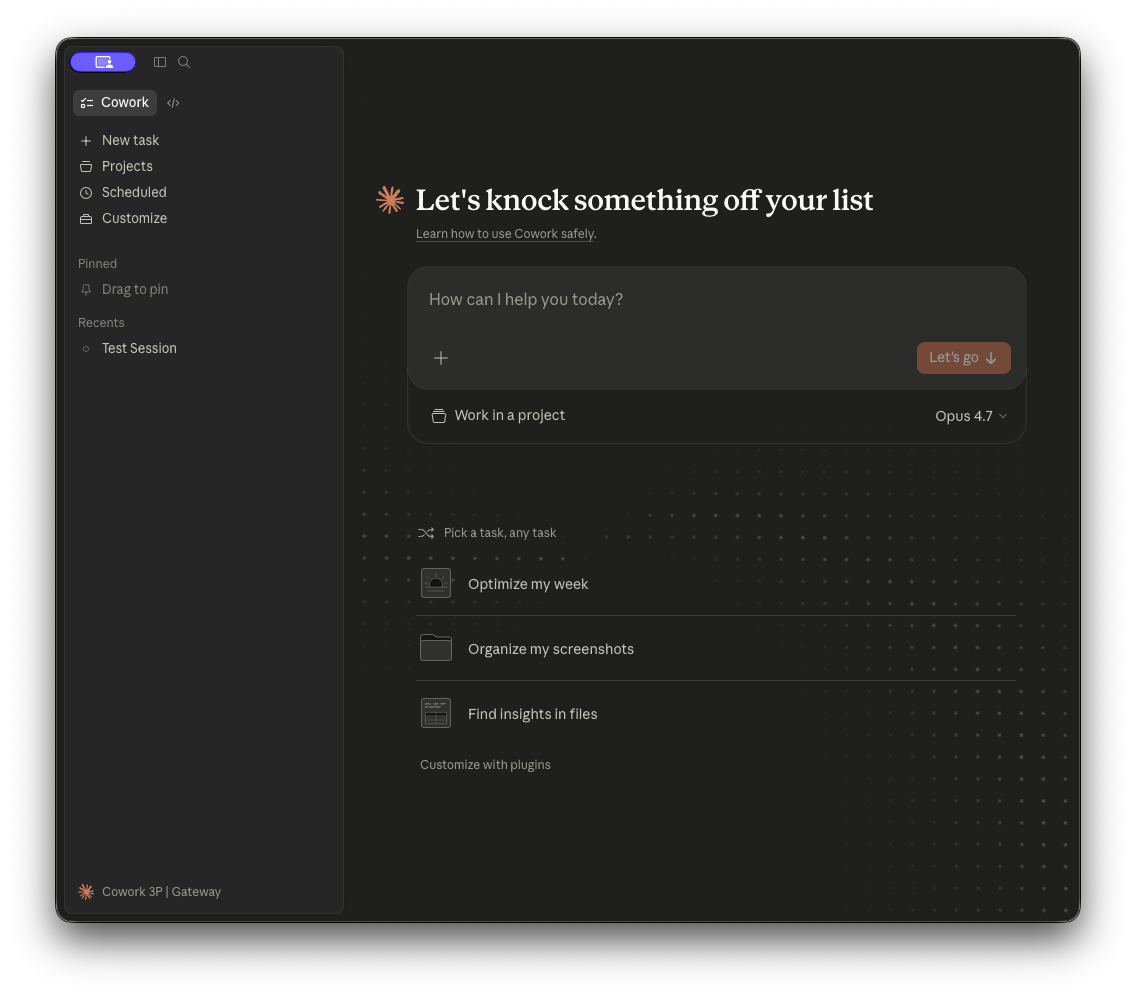
About Claude Cowork on 3P
Run Anthropic's Cowork desktop app against Ask Sage as your inference provider — full Cowork agentic workspace, with all model routing handled by Ask Sage's gateway.
Cowork on third-party (3P) is a deployment mode of the Claude Desktop app (Cowork and Code tabs) that routes all model inference through a provider you configure instead of Anthropic's first-party API. Conversation history is stored locally on the user's device, and the agent runs against the LLM gateway of your choice — including Ask Sage.
You get the same agentic Cowork experience (file creation, multi-step research, sub-agent coordination, the Code tab) with inference and billing handled by Ask Sage. This page walks you through pointing Cowork at Ask Sage as a Gateway provider, picking the model (including Claude Opus 4.7 with the 1M-token context window), and locking down all telemetry to Anthropic so the only outbound traffic is to your Ask Sage endpoint.
Table of Contents
Prerequisites
Before you begin, ensure you have the following:
3P Mode Available
Your Claude Desktop build must support Cowork on 3P (see installation)
Quick Start
The fastest path to a working setup uses Claude Desktop's built-in configuration window — no hand-editing of plist or registry files required.
Open Claude Desktop and go to Developer → Configure third-party inference.
The Developer menu is hidden by default. Enable it from Help → Troubleshooting → Enable Developer Mode, then it will appear in the menu bar.
Choose Gateway as the inference provider.
Set the gateway base URL to https://api.asksage.ai/server/anthropic (no trailing slash) and paste your Ask Sage API key. Set the auth scheme to bearer.
(Recommended) Apply the telemetry-disable settings below before saving.
Click Apply Locally, then fully quit and re-open Claude Desktop. The model picker will auto-discover available models from https://api.asksage.ai/server/anthropic/v1/models.
POST /v1/messages) plus a model-list endpoint (GET /v1/models) — exactly what Cowork on 3P's Gateway provider expects. No need for a separate LiteLLM/Portkey proxy in front of Ask Sage; you can point Cowork directly at us. Configuration
Cowork on 3P is configured entirely through OS-native managed preferences. You can manage them via MDM (recommended for fleets) or by hand in a per-user config file (good for evaluation on your own machine).
macOS (MDM):    /Library/Managed Preferences/<user>/com.anthropic.claudefordesktop.plist
macOS (per-user): ~/Library/Application Support/Claude-3p/claude_desktop_config.json   (under "enterpriseConfig")

Windows (MDM):  HKLM\SOFTWARE\Policies\Claude   (machine)  or  HKCU\SOFTWARE\Policies\Claude   (user)
Windows (per-user): %APPDATA%\Claude-3p\claude_desktop_config.json (under "enterpriseConfig")- When an MDM source is present, it wins. Local values are ignored.
- Configuration is read once at launch — fully quit and reopen the app after any change.
- All values are stored as strings, even booleans (
"true"/"false") and arrays (JSON-encoded into a single string). The most common mistake is writinginferenceModelsorcoworkEgressAllowedHostsas a native plist/registry array — that won't work. They must be a single string containing JSON.
Required keys (Ask Sage / Gateway provider)
| Setting | Value | Why |
|---|---|---|
inferenceProvider | gateway | Selects the Gateway backend — what Ask Sage is, in Cowork's terms. |
inferenceGatewayBaseUrl | https://api.asksage.ai/server/anthropic | Ask Sage's Anthropic-compatible endpoint. Must be HTTPS. Use the equivalent for your Ask Sage instance (e.g. https://api.dev.asksage.ai/server/anthropic for dev). |
inferenceGatewayApiKey | your Ask Sage user API key | Authenticates the request to Ask Sage. Generate this in your Ask Sage account. |
inferenceGatewayAuthScheme | bearer | Required. Ask Sage keys do not start with sk-, so Cowork's auto scheme would default to Authorization: Bearer — which happens to be correct. Setting bearer explicitly avoids any ambiguity. |
deploymentOrganizationUuid | a UUID you generate | Identifies your fleet to Anthropic for telemetry attribution. Set this once per organization. If telemetry is disabled (recommended below) this is cosmetic, but generate one anyway so support cases can be tied back to your deployment. |
disableDeploymentModeChooser | true | Skips the sign-in mode chooser at first launch and boots directly into 3P mode. Stops users from accidentally signing into a personal Anthropic account. |
Models — picker and 1M context window
Cowork on 3P automatically discovers available Ask Sage models by calling GET /server/anthropic/v1/models against your gateway base URL. You do not need to configure inferenceModels just to populate the picker — it fills in automatically.
You only need to set inferenceModels when you want to:
- Restrict the picker to a curated subset of the available models
- Pick which model is the default (the first entry wins)
- Surface a 1M-token context window variant of a model that supports it (Claude Opus 4.7 and 4.6 on Ask Sage)
Enabling Opus 4.7 with 1M context
Add an inferenceModels entry with supports1m: true to surface the 1M context variant in the picker. Order this first if you want it as the default.
[
  { "name": "claude-opus-4-7", "supports1m": true },
  { "name": "claude-opus-4-6", "supports1m": true },
  { "name": "claude-sonnet-4-6" },
  { "name": "claude-sonnet-4-5" },
  { "name": "claude-haiku-4-5" }
]supports1m: This is a capability assertion you make about your deployment — Cowork does not probe Ask Sage to verify it. Only set supports1m: true on models you've confirmed support 1M context. On Ask Sage today, that's Claude Opus 4.7 and Claude Opus 4.6 (both forward the context-1m-2025-08-07 Anthropic beta header). Setting it on a model that doesn't support 1M will fail mid-session once the conversation grows past the model's actual limit. inferenceModels value in your MDM/registry profile must be a single string containing the JSON above — not a native plist <array>. In a .mobileconfig, that means <string>[...]</string> with the entire JSON inside. Disabling all telemetry to Anthropic
By default, Cowork on 3P sends a small amount of operational telemetry to Anthropic-operated hosts (crash reports, product analytics, favicon fetches, auto-update checks). For Ask Sage deployments — particularly in regulated or air-gapped environments — you'll typically want to disable all of it, so that the only outbound traffic from the device is to your Ask Sage endpoint.
Set all four of the following keys to true. With these set, the desktop application makes no outbound connections to Anthropic-operated hosts at runtime.
| Setting | Value | What it blocks |
|---|---|---|
disableEssentialTelemetry | true | Crash reports, error stack traces, performance timings (Sentry, Datadog). |
disableNonessentialTelemetry | true | Product-usage analytics: feature adoption, session counts, UI interactions. |
disableNonessentialServices | true | Favicon fetches and the third-party iframe used for artifact previews. UI degrades cosmetically (generic icons, static previews) but functionality is unaffected. |
disableAutoUpdates | true | Update checks and downloads from Anthropic. Your IT team becomes responsible for distributing new builds. |
disableEssentialTelemetry opts you into a manual support model. Anthropic will have zero remote visibility into failures on your fleet, so to get help with an issue your team will need to collect application logs from affected machines and send them to Anthropic directly. We recommend leaving disableEssentialTelemetry: false during initial rollout, then turning it on after the deployment is stable. Optional: send your own telemetry to your collector
Independently of what's sent to Anthropic, you can export full session activity (prompts, tool calls, token counts, errors) to your own OpenTelemetry collector. This is the recommended way to retain an audit trail in environments that disable Anthropic-bound telemetry.
| Setting | Value | Description |
|---|---|---|
otlpEndpoint | e.g. https://otel.your-org.com | Base URL of your OTLP collector. The endpoint host is automatically added to the sandbox network allowlist. |
otlpProtocol | http/protobuf (default), http/json, or grpc | Wire format used by your collector. |
otlpHeaders | e.g. x-api-key=...,x-org=asksage | Comma-separated key=value pairs sent on every OTLP request (standard OTEL_EXPORTER_OTLP_HEADERS format). |
Recommended security profile (Ask Sage)
This profile is a starting point for regulated or sensitive deployments. The only outbound traffic from a configured device goes to Ask Sage (model inference) and your OTLP collector (audit/telemetry). Anthropic-bound traffic is fully disabled.
{
  "inferenceProvider":            "gateway",
  "inferenceGatewayBaseUrl":      "https://api.asksage.ai/server/anthropic",
  "inferenceGatewayApiKey":       "your-asksage-api-key-here",
  "inferenceGatewayAuthScheme":   "bearer",

  "deploymentOrganizationUuid":   "00000000-0000-0000-0000-000000000000",
  "disableDeploymentModeChooser": "true",

  "inferenceModels":              "[{\"name\":\"claude-opus-4-7\",\"supports1m\":true},{\"name\":\"claude-opus-4-6\",\"supports1m\":true},{\"name\":\"claude-sonnet-4-6\"},{\"name\":\"claude-sonnet-4-5\"},{\"name\":\"claude-haiku-4-5\"}]",

  "disableEssentialTelemetry":    "true",
  "disableNonessentialTelemetry": "true",
  "disableNonessentialServices":  "true",
  "disableAutoUpdates":           "true",

  "isLocalDevMcpEnabled":         "false",
  "isDesktopExtensionEnabled":    "false",
  "isDesktopExtensionDirectoryEnabled": "false",
  "disabledBuiltinTools":         "[\"WebSearch\",\"WebFetch\"]",
  "coworkEgressAllowedHosts":     "[]",
  "allowedWorkspaceFolders":      "[\"~/Documents/AskSage\"]",

  "otlpEndpoint":                 "https://otel.your-org.com"
}enterpriseConfig in claude_desktop_config.json. For MDM delivery, encode the same keys in .mobileconfig (macOS) or as HKLM\SOFTWARE\Policies\Claude registry values (Windows). All values must be strings, including booleans and JSON arrays. The in-app configuration window (Developer → Configure third-party inference) can export the right format for you. The Developer menu is hidden by default — enable it from Help → Troubleshooting → Enable Developer Mode. downloads.claude.ai— VM workspace bundle and Claude CLI binary, fetched at session start. Without this, Cowork sessions cannot start.api.asksage.ai(or your Ask Sage instance host) — model inference- Host of
otlpEndpoint— your OTLP collector (only if you set it)
Verification
After saving the configuration and restarting Claude Desktop, run the following checks.
1. Confirm the model list endpoint is reachable
curl -s https://api.asksage.ai/server/anthropic/v1/models \
  -H "x-api-key: your-asksage-api-key-here" \
  | jq
You should see a JSON response with a data array containing claude-opus-4-7, claude-sonnet-4-5, etc. If you get a 404, you're hitting an Ask Sage instance that hasn't been updated with the model-list endpoint yet — let support know.
2. Confirm Cowork picks up your models
Open Claude Desktop and click the model picker in the Cowork tab. You should see the models from the /v1/models response. If you set inferenceModels with supports1m: true on Opus 4.7, you'll see a separate Opus 4.7 (1M context) entry.
3. Confirm no traffic is leaving to Anthropic hosts
Run a packet capture or check your firewall logs for connections to *.sentry.io, browser-intake-us5-datadoghq.com, a-cdn.anthropic.com, a-api.anthropic.com, api.anthropic.com, or www.claudeusercontent.com. With the locked-down profile applied, the only Anthropic-domain traffic should be the one-time downloads.claude.ai fetch at session start.
Windows (MSIX) — End-to-End Setup
Complete end-to-end setup guide for Windows 10/11 using Ask Sage as the inference gateway. All commands use Command Prompt (cmd.exe).
%LOCALAPPDATA%\Packages\Claude_<publisher-id>\LocalCache\. Anthropic's public docs point at %APPDATA%\Claude-3p\ — that path does not work on MSIX builds. This guide uses the real sandboxed paths throughout. See Why Windows is harder than Mac at the bottom. Step 1 — Install Claude Desktop
Download the installer from claude.com/download. It's a .msix package — double-click to install.
Verify installation and capture your publisher ID:
dir "C:\Program Files\WindowsApps" | findstr /i claudeExpected output (example): Claude_1.3883.0.0_x64__pzs8sxrjxfjjc. The last segment (pzs8sxrjxfjjc) is your publisher ID. Substitute it wherever you see pzs8sxrjxfjjc below — yours may differ.
Step 2 — Initialize sandboxed folders
REM Launch once to create sandboxed filesystem (don't sign in)
start shell:AppsFolder\Claude_pzs8sxrjxfjjc!Claude

REM Wait 15-20 seconds, then kill all Claude processes
taskkill /F /IM claude.exe /T
MSIX apps leave multiple child processes running — closing the window isn't enough. Multiple "SUCCESS" lines from taskkill is normal.
Step 3 — Generate a deployment UUID
cmd.exe has no built-in UUID generator. Use any of these:
REM Option A — Git for Windows:
"C:\Program Files\Git\usr\bin\uuidgen.exe"

REM Option B — PowerShell one-liner:
powershell -Command "[guid]::NewGuid().ToString()"

REM Option C — visit uuidgenerator.net and copy the output00000000-0000-4000-8000-000000000001, and Anthropic can't identify your org on support tickets. Step 4 — Create the config file
mkdir "%LOCALAPPDATA%\Packages\Claude_pzs8sxrjxfjjc\LocalCache\Roaming\Claude-3p" 2>nul
notepad "%LOCALAPPDATA%\Packages\Claude_pzs8sxrjxfjjc\LocalCache\Roaming\Claude-3p\claude_desktop_config.json"
When Notepad asks to create a new file, click Yes. Paste the JSON below, replacing the two placeholders:
{
  "deploymentMode": "3p",
  "enterpriseConfig": {
    "inferenceProvider": "gateway",
    "inferenceGatewayBaseUrl": "https://api.asksage.ai/server/anthropic",
    "inferenceGatewayApiKey": "YOUR_ASKSAGE_TOKEN_HERE",
    "inferenceGatewayAuthScheme": "bearer",
    "deploymentOrganizationUuid": "REPLACE-WITH-GENERATED-UUID",
    "disableDeploymentModeChooser": true,
    "disableEssentialTelemetry": true,
    "disableNonessentialTelemetry": true,
    "disableNonessentialServices": true
  },
  "_cfprefsMigrated": true,
  "preferences": {
    "coworkScheduledTasksEnabled": true,
    "ccdScheduledTasksEnabled": false,
    "coworkWebSearchEnabled": true
  }
}
Replace YOUR_ASKSAGE_TOKEN_HERE with your Ask Sage API key and REPLACE-WITH-GENERATED-UUID with the UUID from Step 3. Save with Ctrl+S.
- If Notepad opens a Save As dialog, set Save as type to All Files — otherwise it appends
.txtand createsclaude_desktop_config.json.txt, which the app ignores. - Encoding should be UTF-8 (default on Windows 11), not "UTF-8 with BOM."
- Models auto-discover.
inferenceModelsis intentionally omitted — the Cowork Gateway spec auto-discovers via the gateway'sGET /v1/modelsendpoint, which Ask Sage implements. To pin the picker to a specific subset or enable 1M context variants, add aninferenceModelskey insideenterpriseConfig— see the Models section above. disableDeploymentModeChooser: trueboots directly into 3P mode. Remove this key if you want the option to fall back to Anthropic sign-in.- All three telemetry keys disabled (
disableEssentialTelemetry,disableNonessentialTelemetry,disableNonessentialServicesalltrue). Appropriate for gov/regulated environments. Tradeoff: Anthropic has no crash data on their side — your team ships logs manually on support tickets.
Step 5 — Validate the file
REM Confirm file has no .txt extension
dir "%LOCALAPPDATA%\Packages\Claude_pzs8sxrjxfjjc\LocalCache\Roaming\Claude-3p"

REM If you see .json.txt, fix it:
ren "%LOCALAPPDATA%\Packages\Claude_pzs8sxrjxfjjc\LocalCache\Roaming\Claude-3p\claude_desktop_config.json.txt" "claude_desktop_config.json"

REM View contents
type "%LOCALAPPDATA%\Packages\Claude_pzs8sxrjxfjjc\LocalCache\Roaming\Claude-3p\claude_desktop_config.json"
Step 6 — Launch and verify
REM Kill any zombie processes first
taskkill /F /IM claude.exe /T

REM Launch fresh
start shell:AppsFolder\Claude_pzs8sxrjxfjjc!Claude
Visual check: Claude should open directly into a chat interface with a model picker — not a claude.ai sign-in screen. The picker should show the models Ask Sage auto-discovered.
Log check: The active 3P log is at:
%LOCALAPPDATA%\Packages\Claude_pzs8sxrjxfjjc\LocalCache\Roaming\Claude-3p\logs\main.log
(This is different from the standard-mode log at ...\Claude\logs\main.log.)
REM Search log for config / gateway issues
findstr /i "enterprise gateway inferenceProvider Failed" "%LOCALAPPDATA%\Packages\Claude_pzs8sxrjxfjjc\LocalCache\Roaming\Claude-3p\logs\main.log"

REM Search for errors and warnings
findstr /i "[error] [warn]" "%LOCALAPPDATA%\Packages\Claude_pzs8sxrjxfjjc\LocalCache\Roaming\Claude-3p\logs\main.log"
What a healthy 3P session looks like in the log
[Lifecycle] Session local_<id>: initializing → running[LocalAgentModeSessionManager] mcpServerStatus returned N servers[CycleHealth] Healthy cycle:withcycle_health: 'healthy'model: 'claude-sonnet-4-5-20250929'(or whichever model you selected)
Bad signs and fixes
| Log shows | Means | Fix |
|---|---|---|
Failed to parse enterprise config "inferenceGatewayBaseUrl": invalid_string | URL validation rejected | Remove trailing slash from the base URL |
| Empty or missing model picker | Gateway GET /v1/models discovery failed | Verify Ask Sage token, or pin models explicitly with inferenceModels |
claude.ai/login and User logged out during IPC wait | Config not read — app is in standard mode | Verify config is at the sandboxed path, JSON is valid, all processes killed before launch |
Not main instance, returning early from app ready | Zombie processes intercepted launch | taskkill /F /IM claude.exe /T + relaunch |
No active account/org for marketplace operations | Config not detected | Wrong config path, invalid JSON, or zombie processes |
Step 7 — Test inference
Type "hi" in the chat and send. You should get a response within a few seconds.
If it hangs, verify the endpoint from cmd:
curl -N -X POST "https://api.asksage.ai/server/anthropic/v1/messages" ^
  -H "Authorization: Bearer YOUR_ASKSAGE_TOKEN" ^
  -H "Content-Type: application/json" ^
-d "{\"model\":\"claude-sonnet-4-5-20250929\",\"max_tokens\":64,\"stream\":true,\"messages\":[{\"role\":\"user\",\"content\":\"hi\"}]}"- SSE frames look correct but Claude Desktop errors with
$.input_tokens→ historical Windows MSIX SSE parsing bug, resolved by auto-update. Check your version withdir "C:\Program Files\WindowsApps" | findstr /i claude— should be 1.3883+. - Single JSON blob instead of SSE → streaming isn't active for your account. Contact Ask Sage platform team.
- HTTP 401/403 → token or endpoint issue. Re-verify your API key and base URL.
Windows path cheat sheet
| What | Path |
|---|---|
| 3P config file | %LOCALAPPDATA%\Packages\Claude_<id>\LocalCache\Roaming\Claude-3p\claude_desktop_config.json |
| 3P log file (active) | %LOCALAPPDATA%\Packages\Claude_<id>\LocalCache\Roaming\Claude-3p\logs\main.log |
| 3P session data | %LOCALAPPDATA%\Packages\Claude_<id>\LocalCache\Roaming\Claude-3p\local-agent-mode-sessions\ |
| Standard-mode log (fallback) | %LOCALAPPDATA%\Packages\Claude_<id>\LocalCache\Roaming\Claude\logs\main.log |
| App install location | C:\Program Files\WindowsApps\Claude_<version>_<id> |
%APPDATA%\Claude-3p\claude_desktop_config.json |
Windows quick command reference
| Action | Command |
|---|---|
| Launch Claude | start shell:AppsFolder\Claude_pzs8sxrjxfjjc!Claude |
| Kill all processes | taskkill /F /IM claude.exe /T |
| Check if running | tasklist | findstr /i claude |
| Open config in Notepad | notepad "%LOCALAPPDATA%\Packages\Claude_pzs8sxrjxfjjc\LocalCache\Roaming\Claude-3p\claude_desktop_config.json" |
| Open config folder | explorer "%LOCALAPPDATA%\Packages\Claude_pzs8sxrjxfjjc\LocalCache\Roaming\Claude-3p" |
| Open log in Notepad | notepad "%LOCALAPPDATA%\Packages\Claude_pzs8sxrjxfjjc\LocalCache\Roaming\Claude-3p\logs\main.log" |
| View log (paged) | type "%LOCALAPPDATA%\...\Claude-3p\logs\main.log" | more |
| Check version | dir "C:\Program Files\WindowsApps" | findstr /i claude |
Why Windows is harder than Mac
Anthropic's Cowork on 3P docs are written assuming a non-sandboxed install. On macOS, ~/Library/Application Support/Claude-3p/ is the real filesystem path and the docs work as written.
On Windows, the .msix installer packages the app as a Microsoft Store-style MSIX bundle, which sandboxes all filesystem writes into %LOCALAPPDATA%\Packages\Claude_<publisher-id>\LocalCache\. Everything the docs say about %APPDATA%\Claude-3p\ silently redirects through this container — meaning config written to the documented path is never read, and logs written during a 3P session never appear in the documented log location.
The redirected paths are:
- Config:
%APPDATA%\Claude-3p\→%LOCALAPPDATA%\Packages\Claude_<id>\LocalCache\Roaming\Claude-3p\ - Logs:
%APPDATA%\Claude\logs\→...\LocalCache\Roaming\Claude-3p\logs\(in 3P mode) or...\Roaming\Claude\logs\(in standard mode)
Use the sandboxed paths and everything else in the Anthropic docs applies as written.
Troubleshooting
Model picker is empty
Means Cowork couldn't reach GET /server/anthropic/v1/models on your Ask Sage instance. Check:
inferenceGatewayBaseUrlis correct (no trailing slash) and uses HTTPSinferenceGatewayAuthSchemeis set tox-api-key— without this, Cowork's auto-detect sends the key as a Bearer token and the model-list call returns 401- Your Ask Sage instance has the
/v1/modelsendpoint deployed (introduced via Server PR #540 — check with the curl from Verification above)
Opus 4.7 (1M) variant doesn't appear
The name field in inferenceModels must exactly match the ID returned by /v1/models. If discovery returns claude-opus-4-7 but you set supports1m on an alias like opus-47, the variant won't appear.
Configuration changes aren't taking effect
Cowork on 3P reads configuration once at launch. After any change, fully quit the app (not just close the window) and reopen it. On macOS that's ⌘+Q; on Windows, right-click the tray icon and choose Quit.
"Array key is invalid"
You wrote inferenceModels or coworkEgressAllowedHosts as a native plist <array> or registry multi-string. Both must be a single string containing JSON. Wrap the JSON in <string>...</string> (macOS) or store as a REG_SZ single string (Windows).
Reference
- Anthropic — Cowork on 3P overview
- Anthropic — Cowork on 3P configuration reference (every supported key)
- Anthropic — Cowork on 3P telemetry & egress
- Anthropic — Cowork on 3P installation & setup
- Anthropic — Cowork monitoring (OpenTelemetry schema)
- Ask Sage — Anthropic API compatibility guide
- Ask Sage — Claude Code integration (related: terminal CLI vs. desktop app)