Ask Sage API
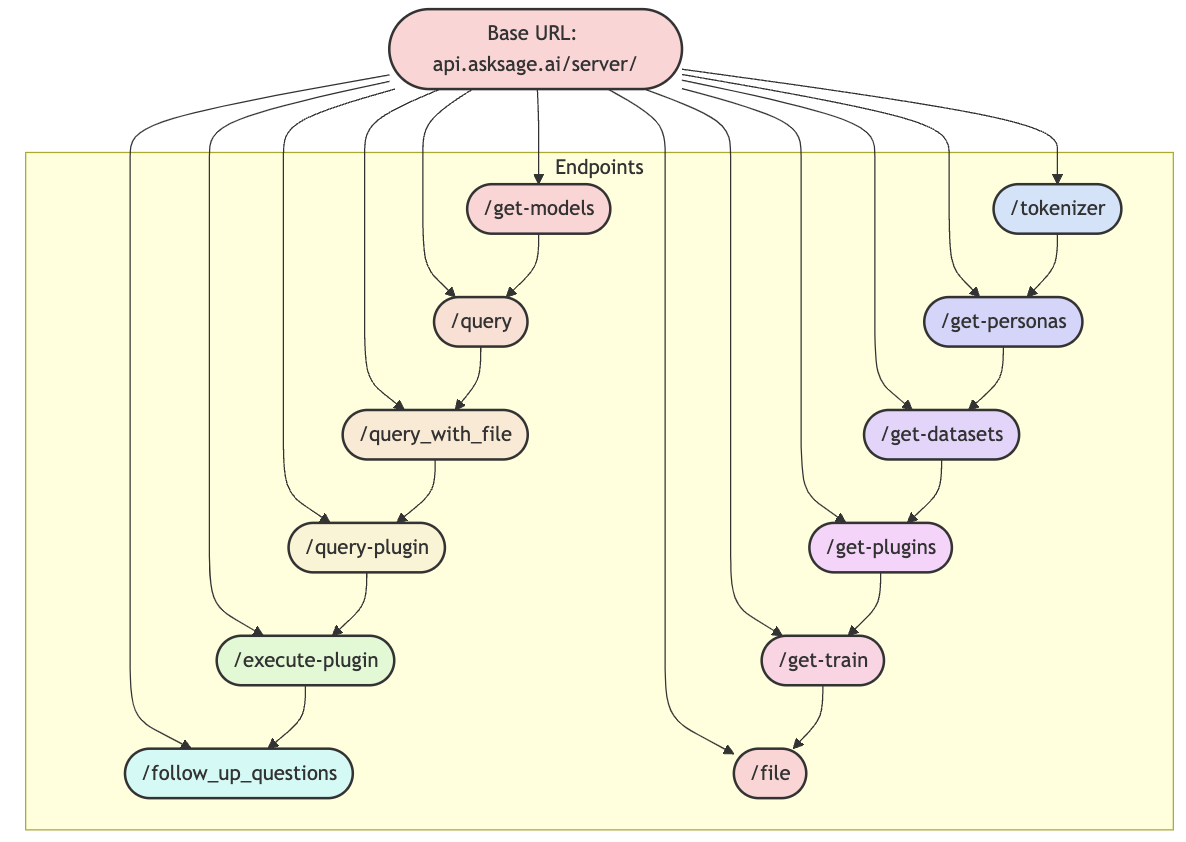
Comprehensive guide to Ask Sage API endpoints
Table of contents
Overview
The Ask Sage API is a modern RESTful API providing comprehensive access to the Ask Sage platform. Our API architecture is divided into two specialized components, each designed for specific functionalities. There are the Server API and the User API. Each API has its own base URL, purpose, and set of endpoints.
The Server API focuses on core AI operations, model queries, and server management, while the User API handles user management, authentication, and dataset operations. This separation ensures optimized performance and security for different types of interactions with the Ask Sage platform.
User API Endpoints
Purpose: User management, authentication, and dataset operations
Base URL: api.asksage.ai/user/
Documentation
Swagger Documentation:
View User API Documentation →Available Endpoints
| Endpoint | Description |
|---|---|
POST /get-token-with-api-key | Get an access token with API Key and email |
POST /get-user-logins | Get your last logins (limited to 5 by default) |
POST /get-user-logs | Get your last prompts |
POST /add-dataset | Add a new dataset |
POST /delete-datasets | Delete a dataset |
POST /get-chats | Get all chat sessions for user |
POST /get-chat-session | Get specific chat session |
POST /delete-chat-session | Delete chat session |
POST /deassign-dataset | Remove dataset from user |
POST /update-permission-dataset | Update dataset permissions |
POST /get-datasets-with-permissions | Get user datasets with permissions |
POST /get-user-api-keys | Get user API keys |
POST /user-api-key | Create new API key |
DELETE /user-api-key | Delete API key |
Server API Endpoints
Purpose: Core AI operations, model queries, and server management
Base URL: api.asksage.ai/server/
Documentation
Swagger Documentation:
View Server API Documentation →Available Endpoints
| Endpoint | Description |
|---|---|
POST /get-models | Returns a list of available models |
POST /query | Main endpoint for generating completions |
POST /query_with_file | Query with file for generating completions |
POST /query-plugin | Query with plugin for generating completions |
POST /execute-plugin | Execute a plugin with provided content |
POST /follow_up_questions | Generate follow-up questions |
POST /tokenizer | Get tokens of string value |
POST /get-personas | Get available personas |
POST /get-datasets | Returns a list of available datasets |
POST /get-plugins | Returns a list of available plugins |
POST /train | Train the model based on user input |
POST /file | Convert supported file to plain text |
POST /execute-plugin-with-file | Execute plugin with file input |
POST /get-deep-agent | Get streaming updates from deep agent |
POST /add-mcp-server | Add new MCP server for user |
PUT /update-mcp-server | Update existing MCP server configuration |
GET /list-mcp-servers | Get list of all MCP servers for user |
POST /list-mcp-servers | Get list of all MCP servers for user |
GET /list-mcp-whitelisted-servers | Get list of whitelisted MCP servers |
GET /list-mcp-tools | Get list of available MCP tools |
DELETE /delete-mcp-server | Soft delete MCP server |
DELETE /dataset | Delete specific dataset |
POST /delete-filename-from-dataset | Remove specific file from dataset |
POST /get-all-files-ingested | Returns list of all ingested files |
POST /copy-files-dataset | Copy files from one dataset to another |
POST /vote-down | Mark response as unhelpful or incorrect |
GET /count-monthly-tokens | Returns count of tokens used this month |
POST /count-monthly-tokens | Returns token count for specific app |
GET /count-monthly-teach-tokens | Returns training tokens used this month |
POST /train-with-file | Train model using file content |
POST /train-with-array | Train model using array of content |
GET /get-secrets | Returns list of stored secrets (keys only) |
POST /get-text-to-speech | Generate audio from text using TTS |
GET /list-agents | Returns a list of all agents available to the user |
POST /execute-agent | Execute an agent with a message and optional variables |
Code Examples
Quick Start Examples
Each example includes Bash, Python, and JavaScript code. Use the language selector to switch between implementations. Replace your_access_token with a valid token obtained from the Get Access Token endpoint.
Authentication
curl -X POST 'https://api.asksage.ai/user/get-token-with-api-key' \
  -H 'Accept: application/json' \
  -H 'Content-Type: application/json' \
  -d '{
    "email": "your_email@email.com",
    "api_key": "your_api_key"
  }'import requests

url = 'https://api.asksage.ai/user/get-token-with-api-key'
headers = {
    'Accept': 'application/json',
    'Content-Type': 'application/json'
}
data = {
    'email': 'your_email@email.com',
    'api_key': 'your_api_key'
}

response = requests.post(url, headers=headers, json=data)
print(response.json())const response = await fetch('https://api.asksage.ai/user/get-token-with-api-key', {
  method: 'POST',
  headers: {
    'Accept': 'application/json',
    'Content-Type': 'application/json'
  },
  body: JSON.stringify({
    email: 'your_email@email.com',
    api_key: 'your_api_key'
  })
});

const data = await response.json();
console.log(data);
curl -X POST 'https://api.asksage.ai/user/user-api-key' \
  -H 'x-access-tokens: your_access_token' \
  -H 'Content-Type: application/json' \
  -d '{"name": "My API Key"}'import requests

url = 'https://api.asksage.ai/user/user-api-key'
headers = {
    'x-access-tokens': 'your_access_token',
    'Content-Type': 'application/json'
}
data = {'name': 'My API Key'}

response = requests.post(url, headers=headers, json=data)

if response.status_code == 200:
    print('Success:', response.json())
else:
    print('Error:', response.json())const response = await fetch('https://api.asksage.ai/user/user-api-key', {
  method: 'POST',
  headers: {
    'x-access-tokens': 'your_access_token',
    'Content-Type': 'application/json'
  },
  body: JSON.stringify({ name: 'My API Key' })
});

const data = await response.json();
console.log(data);
curl -X POST 'https://api.asksage.ai/user/get-user-api-keys' \
  -H 'x-access-tokens: your_access_token' \
  -H 'Content-Type: application/json'import requests

url = 'https://api.asksage.ai/user/get-user-api-keys'
headers = {
    'x-access-tokens': 'your_access_token',
    'Content-Type': 'application/json'
}

response = requests.post(url, headers=headers, json={})

if response.status_code == 200:
    print('Success:', response.json())
else:
    print('Error:', response.json())const response = await fetch('https://api.asksage.ai/user/get-user-api-keys', {
  method: 'POST',
  headers: {
    'x-access-tokens': 'your_access_token',
    'Content-Type': 'application/json'
  },
  body: JSON.stringify({})
});

const data = await response.json();
console.log(data);
Core AI Operations
Send Query
Send a message to an AI model and receive a response. This is the primary endpoint for interacting with Ask Sage.
curl -X POST 'https://api.asksage.ai/server/query' \
  -H 'x-access-tokens: your_access_token' \
  -H 'Content-Type: application/json' \
  -d '{
    "message": "What is Ask Sage?",
    "persona": 1,
    "dataset": ["dataset1", "dataset2"],
    "model": "gpt-4.1-mini",
    "temperature": 0.7,
    "limit_references": 5,
    "live": 1
  }'import requests

url = 'https://api.asksage.ai/server/query'
headers = {
    'x-access-tokens': 'your_access_token',
    'Content-Type': 'application/json'
}
data = {
    'message': 'What is Ask Sage?',
    'persona': 1,
    'dataset': ['dataset1', 'dataset2'],
    'model': 'gpt-4.1-mini',
    'temperature': 0.7,
    'limit_references': 5,
    'live': 1
}

response = requests.post(url, headers=headers, json=data)
print(response.json())const response = await fetch('https://api.asksage.ai/server/query', {
  method: 'POST',
  headers: {
    'x-access-tokens': 'your_access_token',
    'Content-Type': 'application/json'
  },
  body: JSON.stringify({
    message: 'What is Ask Sage?',
    persona: 1,
    dataset: ['dataset1', 'dataset2'],
    model: 'gpt-4.1-mini',
    temperature: 0.7,
    limit_references: 5,
    live: 1
  })
});

const data = await response.json();
console.log(data);
curl -X POST 'https://api.asksage.ai/server/follow-up-questions' \
  -H 'x-access-tokens: your_access_token' \
  -H 'Content-Type: application/json' \
  -d '{
    "message": [
      {"user": "me", "message": "What is Ask Sage?"}
    ],
    "model": "gpt-4.1-mini",
    "dataset": "none"
  }'import requests

url = 'https://api.asksage.ai/server/follow-up-questions'
headers = {
    'x-access-tokens': 'your_access_token',
    'Content-Type': 'application/json'
}
data = {
    'message': [
        {'user': 'me', 'message': 'What is Ask Sage?'}
    ],
    'model': 'gpt-4.1-mini',
    'dataset': 'none'
}

response = requests.post(url, headers=headers, json=data)
print(response.json())const response = await fetch('https://api.asksage.ai/server/follow-up-questions', {
  method: 'POST',
  headers: {
    'x-access-tokens': 'your_access_token',
    'Content-Type': 'application/json'
  },
  body: JSON.stringify({
    message: [
      {user: 'me', message: 'What is Ask Sage?'}
    ],
    model: 'gpt-4.1-mini',
    dataset: 'none'
  })
});

const data = await response.json();
console.log(data);
curl -X POST 'https://api.asksage.ai/server/get-models' \
  -H 'x-access-tokens: your_access_token' \
  -H 'Content-Type: application/json'import requests

url = 'https://api.asksage.ai/server/get-models'
headers = {
    'x-access-tokens': 'your_access_token',
    'Content-Type': 'application/json'
}

response = requests.post(url, headers=headers)
print(response.json())const response = await fetch('https://api.asksage.ai/server/get-models', {
  method: 'POST',
  headers: {
    'x-access-tokens': 'your_access_token',
    'Content-Type': 'application/json'
  }
});

const data = await response.json();
console.log(data);
curl -X POST 'https://api.asksage.ai/server/get-personas' \
  -H 'x-access-tokens: your_access_token' \
  -H 'Content-Type: application/json'import requests

url = 'https://api.asksage.ai/server/get-personas'
headers = {
    'x-access-tokens': 'your_access_token',
    'Content-Type': 'application/json'
}

response = requests.post(url, headers=headers)
print(response.json())const response = await fetch('https://api.asksage.ai/server/get-personas', {
  method: 'POST',
  headers: {
    'x-access-tokens': 'your_access_token',
    'Content-Type': 'application/json'
  }
});

const data = await response.json();
console.log(data);
Files & Datasets
curl -X POST 'https://api.asksage.ai/server/file' \
  -H 'x-access-tokens: your_access_token' \
  -H 'Content-Type: multipart/form-data' \
  -F 'file=@/path/to/file.pdf'import requests

url = 'https://api.asksage.ai/server/file'
headers = {
    'x-access-tokens': 'your_access_token'
}
files = {
    'file': open('/path/to/file.pdf', 'rb')
}

response = requests.post(url, headers=headers, files=files)
print(response.json())import FormData from 'form-data';
import fs from 'fs';

const form = new FormData();
form.append('file', fs.createReadStream('/path/to/file.pdf'));

const response = await fetch('https://api.asksage.ai/server/file', {
  method: 'POST',
  headers: {
    'x-access-tokens': 'your_access_token',
    ...form.getHeaders()
  },
  body: form
});

const data = await response.json();
console.log(data);
curl -X POST 'https://api.asksage.ai/server/train' \
  -H 'x-access-tokens: your_access_token' \
  -H 'Content-Type: application/json' \
  -d '{
    "context": "Product documentation",
    "content": "Your content here...",
    "summarize": true,
    "summarize_model": "gpt-4.1-mini",
    "force_dataset": "user_custom_123_MyDataset_content"
  }'import requests

url = 'https://api.asksage.ai/server/train'
headers = {
    'x-access-tokens': 'your_access_token',
    'Content-Type': 'application/json'
}
data = {
    'context': 'Product documentation',
    'content': 'Your content here...',
    'summarize': True,
    'summarize_model': 'gpt-4.1-mini',
    'force_dataset': 'user_custom_123_MyDataset_content'
}

response = requests.post(url, headers=headers, json=data)
print(response.json())const response = await fetch('https://api.asksage.ai/server/train', {
  method: 'POST',
  headers: {
    'x-access-tokens': 'your_access_token',
    'Content-Type': 'application/json'
  },
  body: JSON.stringify({
    context: 'Product documentation',
    content: 'Your content here...',
    summarize: true,
    summarize_model: 'gpt-4.1-mini',
    force_dataset: 'user_custom_123_MyDataset_content'
  })
});

const data = await response.json();
console.log(data);
curl -X POST 'https://api.asksage.ai/server/get-datasets' \
  -H 'x-access-tokens: your_access_token' \
  -H 'Content-Type: application/json'import requests

url = 'https://api.asksage.ai/server/get-datasets'
headers = {
    'x-access-tokens': 'your_access_token',
    'Content-Type': 'application/json'
}

response = requests.post(url, headers=headers)
print(response.json())const response = await fetch('https://api.asksage.ai/server/get-datasets', {
  method: 'POST',
  headers: {
    'x-access-tokens': 'your_access_token',
    'Content-Type': 'application/json'
  }
});

const data = await response.json();
console.log(data);
Agents
# Non-streaming request
curl -X POST 'https://api.asksage.ai/server/execute-agent' \
  -H 'x-access-tokens: your_access_token' \
  -H 'Content-Type: application/json' \
  -d '{
    "agent_id": 1,
    "message": "What are the latest billing updates?",
    "streaming": false,
    "variables": {
      "priority": "high"
    }
  }'

# Streaming request
curl -X POST 'https://api.asksage.ai/server/execute-agent' \
  -H 'x-access-tokens: your_access_token' \
  -H 'Content-Type: application/json' \
  -N \
  -d '{
    "agent_id": 1,
    "message": "Summarize this quarter'\''s performance",
    "streaming": true
  }'

# With file upload (multipart/form-data)
curl -X POST 'https://api.asksage.ai/server/execute-agent' \
  -H 'x-access-tokens: your_access_token' \
  -F 'agent_id=1' \
  -F 'message=Analyze this document' \
  -F 'streaming=false' \
  -F 'variables={"my_file_var": "report.pdf"}' \
  -F 'file=@report.pdf'import requests
import json

# Non-streaming request
url = 'https://api.asksage.ai/server/execute-agent'
headers = {
    'x-access-tokens': 'your_access_token',
    'Content-Type': 'application/json'
}
data = {
    'agent_id': 1,
    'message': 'What are the latest billing updates?',
    'streaming': False,
    'variables': {
        'priority': 'high'
    }
}

response = requests.post(url, headers=headers, json=data)
result = response.json()
print(result['response']['response'])

# Streaming request
data['streaming'] = True
response = requests.post(url, headers=headers, json=data, stream=True)
for line in response.iter_lines():
    if line:
        event = json.loads(line)
        print(f"Event: {event['event']}", event.get('data', ''))

# With file upload
files = {'file': open('report.pdf', 'rb')}
form_data = {
    'agent_id': '1',
    'message': 'Analyze this document',
    'streaming': 'false',
    'variables': json.dumps({'my_file_var': 'report.pdf'})
}
response = requests.post(
    url,
    headers={'x-access-tokens': 'your_access_token'},
    data=form_data,
    files=files
)
print(response.json())// Non-streaming request
const response = await fetch('https://api.asksage.ai/server/execute-agent', {
  method: 'POST',
  headers: {
    'x-access-tokens': 'your_access_token',
    'Content-Type': 'application/json'
  },
  body: JSON.stringify({
    agent_id: 1,
    message: 'What are the latest billing updates?',
    streaming: false,
    variables: {
      priority: 'high'
    }
  })
});

const result = await response.json();
console.log(result.response.response);

// Streaming request
const streamResponse = await fetch('https://api.asksage.ai/server/execute-agent', {
  method: 'POST',
  headers: {
    'x-access-tokens': 'your_access_token',
    'Content-Type': 'application/json'
  },
  body: JSON.stringify({
    agent_id: 1,
    message: 'Summarize this quarter\'s performance',
    streaming: true
  })
});

const reader = streamResponse.body.getReader();
const decoder = new TextDecoder();

while (true) {
  const { done, value } = await reader.read();
  if (done) break;
  const text = decoder.decode(value);
  const events = text.split('\n').filter(line => line.trim());
  for (const eventStr of events) {
    const event = JSON.parse(eventStr);
    console.log(`Event: ${event.event}`, event.data);
  }
}
User Management
curl -X POST 'https://api.asksage.ai/user/get-user-logins' \
  -H 'x-access-tokens: your_access_token' \
  -H 'Content-Type: application/json' \
  -d '{"limit": 5}'import requests

url = 'https://api.asksage.ai/user/get-user-logins'
headers = {
    'x-access-tokens': 'your_access_token',
    'Content-Type': 'application/json'
}
data = {'limit': 5}

response = requests.post(url, headers=headers, json=data)

if response.status_code == 200:
    print('Success:', response.json())
else:
    print('Error:', response.json())const response = await fetch('https://api.asksage.ai/user/get-user-logins', {
  method: 'POST',
  headers: {
    'x-access-tokens': 'your_access_token',
    'Content-Type': 'application/json'
  },
  body: JSON.stringify({ limit: 5 })
});

const data = await response.json();
console.log(data);
curl -X POST 'https://api.asksage.ai/user/get-chats' \
  -H 'x-access-tokens: your_access_token' \
  -H 'Content-Type: application/json'import requests

url = 'https://api.asksage.ai/user/get-chats'
headers = {
    'x-access-tokens': 'your_access_token',
    'Content-Type': 'application/json'
}

response = requests.post(url, headers=headers, json={})

if response.status_code == 200:
    print('Success:', response.json())
else:
    print('Error:', response.json())const response = await fetch('https://api.asksage.ai/user/get-chats', {
  method: 'POST',
  headers: {
    'x-access-tokens': 'your_access_token',
    'Content-Type': 'application/json'
  },
  body: JSON.stringify({})
});

const data = await response.json();
console.log(data);
curl -X POST 'https://api.asksage.ai/user/get-user-logs' \
  -H 'x-access-tokens: your_access_token' \
  -H 'Content-Type: application/json'import requests

url = 'https://api.asksage.ai/user/get-user-logs'
headers = {
    'x-access-tokens': 'your_access_token',
    'Content-Type': 'application/json'
}

response = requests.post(url, headers=headers, json={})

if response.status_code == 200:
    print('Success:', response.json())
else:
    print('Error:', response.json())const response = await fetch('https://api.asksage.ai/user/get-user-logs', {
  method: 'POST',
  headers: {
    'x-access-tokens': 'your_access_token',
    'Content-Type': 'application/json'
  },
  body: JSON.stringify({})
});

const data = await response.json();
console.log(data);
Important Note
Base URLs may vary depending on your environment. For assistance, please contact us at support@asksage.ai