Token Management
Manage and distribute tokens for users on the Ask Sage platform
Table of Contents
Administrators have the ability to manage tokens for users on the Ask Sage platform. This section covers how Administrators can effectively manage and distribute tokens to users in their organization.

Token Management Dashboard
- All users are required to have a minimum of 200K Ask Sage Tokens. For example, if you have 4 accounts and purchased 2M tokens, each account would be assigned 200K Ask Sage tokens each.
- If more tokens are needed, contact us at sales@asksage.ai
Assigning Tokens
Assigning tokens to users is a straightforward process. Administrators can assign tokens to users by navigating to the Administrator Dashboard and interacting with the User Table.
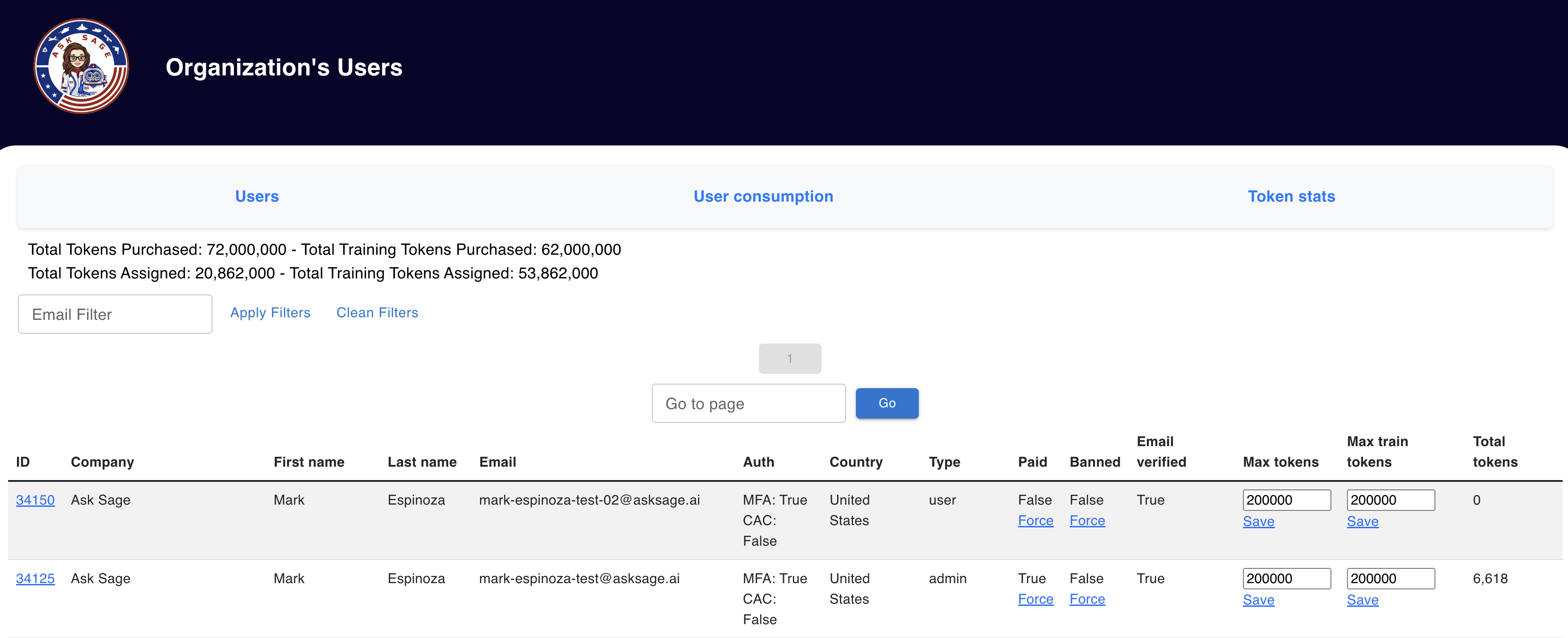
Administrator Dashboard with User Table
Confirming Token Availability
Before assigning tokens to users, Administrators need to ensure that they have the necessary tokens available in their Enterprise Account. To confirm the availability of tokens, Administrators can check the Token Balance which is displayed above the User Table.

Token Balance Display
Step-by-Step Token Assignment
Administrators can assign and distribute tokens as needed within their organization. Follow these steps to assign tokens to users:
Token Assignment Steps
- Navigate to the User Table in the Administrator Dashboard
- Locate the user you want to assign tokens to
- Interact with the Max Tokens column to assign inference tokens
- Interact with the Max Train Tokens column to assign training tokens
- Click Save for each update (see important note below)

User Table with Token Columns
Token Type Definitions
Understanding the different token types is essential for proper token allocation:
- Max Tokens: Represents the total number of inference tokens assigned to a user
- Max Train Tokens: Represents the total number of tokens assigned to a user for training purposes