Codex Integration
Bring Ask Sage's AI models directly into your terminal with Codex CLI
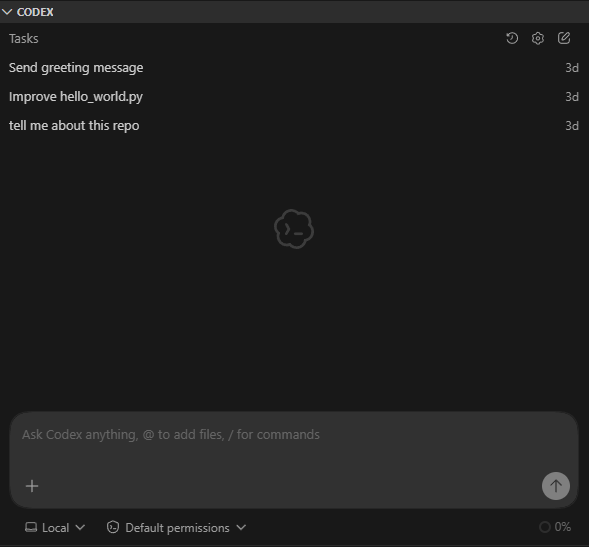
About Codex
Bring Ask Sage's AI models directly into your terminal or IDE with OpenAI's official CLI Codex, now integrated with Ask Sage.
Table of Contents
Prerequisites
Installation
Codex can be installed in two ways:
Option 1: VSCode Extension
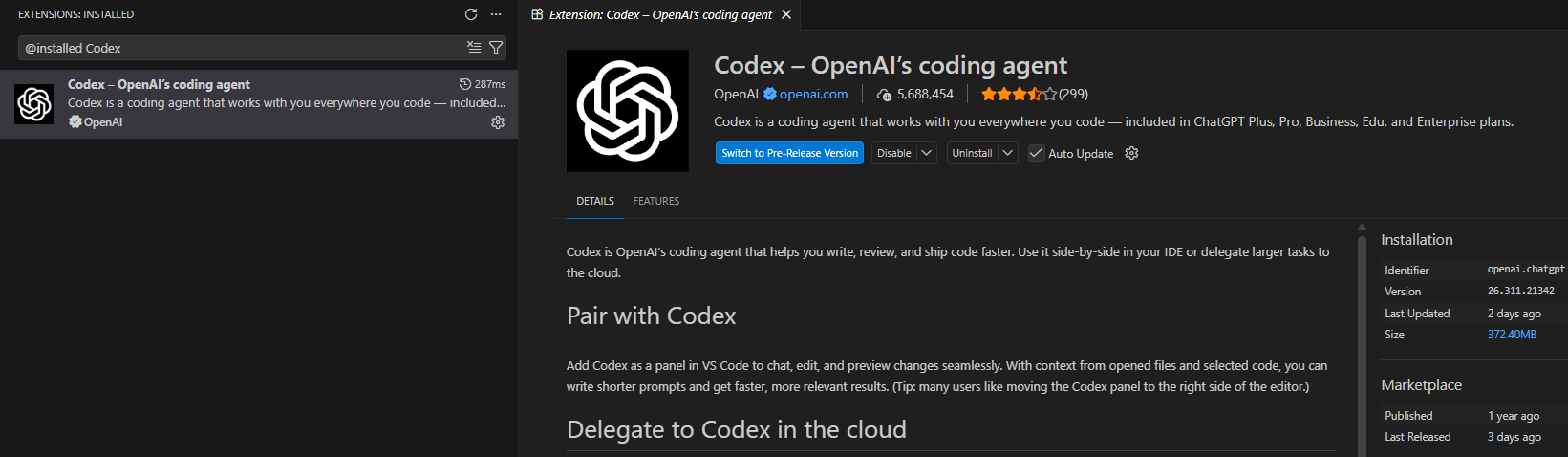
Install the Codex extension directly in Visual Studio Code:
Open VSCode and navigate to the Extensions view (Ctrl+Shift+X or Cmd+Shift+X on Mac)
Search for "Codex-OpenAI's coding agent" by OpenAI
Click the Install button to add the extension to your VSCode
Option 2: CLI Installation (via npm)
npm i -g @openai/codexConfiguration Methods
Configure Ask Sage as the model provider in ~/.codex/config.toml. If the config.toml file doesn't exist, create it. Choose one of the two options below.
The example configs below disable Codex update checks to reduce outbound requests. If your environment allows update checks, you can set check_for_update_on_startup = true.
Option 1: Hard-Coded API Key
Hard code your Ask Sage API key directly into the config file:
# Core Model Selection
model = "gpt-5.4"
model_provider = "asksage"

# Disable update checks to avoid unnecessary outbound requests.
check_for_update_on_startup = true

# Disable Web Search (Sends Queries Externally)
# "cached" (default) serves results from the web search cache.
# "live" fetches the most recent data from the web (same as --search).
# "disabled" turns off the web search tool.
web_search = "disabled"

# Approval & Sandbox
approval_policy = "on-request"
allow_login_shell = true
sandbox_mode = "read-only"
model_reasoning_effort = "medium"

# Model Provider — Ask Sage Passthrough
[model_providers.asksage]
name = "AskSage Passthrough"
base_url = "https://api.asksage.ai/server/openai/v1"
wire_api = "responses"
http_headers = { "x-access-tokens" = "your-api-key" }

# Features
[features]
multi_agent = true
runtime_metrics = false
apps = false
apps_mcp_gateway = false
responses_websockets = false
responses_websockets_v2 = false

# Sandbox Settings — No Network from Sandbox
[sandbox_workspace_write]
writable_roots = []
network_access = false
exclude_tmpdir_env_var = false
exclude_slash_tmp = false

# Network Permissions — Locked to Ask Sage API Only
[permissions.network]
enabled = true
mode = "limited"
allowed_domains = ["api.asksage.ai"]
denied_domains = ["statsig.com", "statsigapi.net", "featuregates.org", "api.openai.com"]
allow_local_binding = false
dangerously_allow_non_loopback_proxy = false
dangerously_allow_non_loopback_admin = false
dangerously_allow_all_unix_sockets = false

# Shell Environment Policy
[shell_environment_policy]
inherit = "all"
ignore_default_excludes = false
exclude = []
set = {}
include_only = []
experimental_use_profile = false

# History — Disabled for Classified Environments
[history]
persistence = "none"

# TUI
[tui]
notifications = false
animations = true
show_tooltips = true

# Analytics — Disabled
[analytics]
enabled = false

# Feedback — Disabled
[feedback]
enabled = false

# OpenTelemetry — Disabled
[otel]
log_user_prompt = false
environment = "production"
exporter = "none"
trace_exporter = "none"
metrics_exporter = "none"

# Notices — Suppress All
[notice]
hide_full_access_warning = true
hide_world_writable_warning = true
hide_rate_limit_model_nudge = true

# MCP Servers
[mcp_servers]

# Profiles
[profiles]

# Projects
[projects]

# Tools
[tools]

# Windows
[windows]
sandbox = "unelevated"model: The model to use (e.g.,gpt-5.4forCommercial,gpt-4.1-govforGovernmenttenants)base_url: Your Ask Sage Server Base URL with/server/openai/v1path. Note this varies based on the instance of Ask Sage you are using. Please verify this Base URL when you Create your API Key, the corresponding Base URL will be underneath.http_headers: Contains your Ask Sage API key via thex-access-tokensheader
Option 2: Environment Variable (Recommended)
Use an environment variable for your API key instead of hard-coding it. You will need to run the export command each time you open a new terminal before running codex:
export ASKSAGE_API_KEY="your-API-Key"Then use this ~/.codex/config.toml:
# Core Model Selection
model = "gpt-5.4"
model_provider = "asksage"

# Disable update checks to avoid unnecessary outbound requests.
check_for_update_on_startup = true

# Disable Web Search (Sends Queries Externally)
# "cached" (default) serves results from the web search cache.
# "live" fetches the most recent data from the web (same as --search).
# "disabled" turns off the web search tool.
web_search = "disabled"

# Approval & Sandbox
approval_policy = "on-request"
allow_login_shell = true
sandbox_mode = "read-only"
model_reasoning_effort = "medium"

# Model Provider — Ask Sage Passthrough
[model_providers.asksage]
name = "AskSage Passthrough"
base_url = "https://api.asksage.ai/server/openai/v1"
wire_api = "responses"
env_key = "ASKSAGE_API_KEY"

# Features
[features]
multi_agent = true
runtime_metrics = false
apps = false
apps_mcp_gateway = false
responses_websockets = false
responses_websockets_v2 = false

# Sandbox Settings — No Network from Sandbox
[sandbox_workspace_write]
writable_roots = []
network_access = false
exclude_tmpdir_env_var = false
exclude_slash_tmp = false

# Network Permissions — Locked to Ask Sage API Only
[permissions.network]
enabled = true
mode = "limited"
allowed_domains = ["api.asksage.ai"]
denied_domains = ["statsig.com", "statsigapi.net", "featuregates.org", "api.openai.com"]
allow_local_binding = false
dangerously_allow_non_loopback_proxy = false
dangerously_allow_non_loopback_admin = false
dangerously_allow_all_unix_sockets = false

# Shell Environment Policy
[shell_environment_policy]
inherit = "all"
ignore_default_excludes = false
exclude = []
set = {}
include_only = []
experimental_use_profile = false

# History — Disabled for Classified Environments
[history]
persistence = "none"

# TUI
[tui]
notifications = false
animations = true
show_tooltips = true

# Analytics — Disabled
[analytics]
enabled = false

# Feedback — Disabled
[feedback]
enabled = false

# OpenTelemetry — Disabled
[otel]
log_user_prompt = false
environment = "production"
exporter = "none"
trace_exporter = "none"
metrics_exporter = "none"

# Notices — Suppress All
[notice]
hide_full_access_warning = true
hide_world_writable_warning = true
hide_rate_limit_model_nudge = true

# MCP Servers
[mcp_servers]

# Profiles
[profiles]

# Projects
[projects]

# Tools
[tools]

# Windows
[windows]
sandbox = "unelevated"DoD/DoW Network Configuration (In Development)
Prerequisites
You'll need the same DoD root certificate (PEM format) that was configured for the Continue.Dev extension. If you haven't already created this file, see the Continue.Dev DoD Certificate Configuration for instructions.
Configuration for VSCode Extension
Add the following to your VSCode config.toml:
# Core Model Selection
model = "gpt-4.1-gov"
model_provider = "asksage"

# Disable update checks to avoid unnecessary outbound requests.
check_for_update_on_startup = true

# Disable Web Search (Sends Queries Externally)
# "cached" (default) serves results from the web search cache.
# "live" fetches the most recent data from the web (same as --search).
# "disabled" turns off the web search tool.
web_search = "disabled"

# Approval & Sandbox
approval_policy = "on-request"
allow_login_shell = true
sandbox_mode = "read-only"
model_reasoning_effort = "medium"

# Model Provider — Ask Sage Passthrough (Azure Government OpenAI)
[model_providers.asksage]
name = "AskSage Passthrough"
base_url = "https://api.genai.army.mil/server/openai/v1"
wire_api = "responses"
http_headers = { "x-access-tokens" = "your-api-key" }

[model_providers.asksage.tls]
ca-certificate = "C:\\ProgramData\\ssl\\certs\\DoD_CAs.pem"

# Features
[features]
multi_agent = true
runtime_metrics = false
apps = false
apps_mcp_gateway = false
responses_websockets = false
responses_websockets_v2 = false

# Sandbox Settings — No Network from Sandbox
[sandbox_workspace_write]
writable_roots = []
network_access = false
exclude_tmpdir_env_var = false
exclude_slash_tmp = false

# Network Permissions — Locked to Ask Sage API Only
[permissions.network]
enabled = true
mode = "limited"
allowed_domains = ["api.genai.army.mil"]
denied_domains = ["statsig.com", "statsigapi.net", "featuregates.org", "api.openai.com"]
allow_local_binding = false
dangerously_allow_non_loopback_proxy = false
dangerously_allow_non_loopback_admin = false
dangerously_allow_all_unix_sockets = false

# Shell Environment Policy
[shell_environment_policy]
inherit = "all"
ignore_default_excludes = false
exclude = []
set = {}
include_only = []
experimental_use_profile = false

# History — Disabled for Classified Environments
[history]
persistence = "none"

# TUI
[tui]
notifications = false
animations = true
show_tooltips = true

# Analytics — Disabled
[analytics]
enabled = false

# Feedback — Disabled
[feedback]
enabled = false

# OpenTelemetry — Disabled
[otel]
log_user_prompt = false
environment = "production"
exporter = "none"
trace_exporter = "none"
metrics_exporter = "none"

# Notices — Suppress All
[notice]
hide_full_access_warning = true
hide_world_writable_warning = true
hide_rate_limit_model_nudge = true

# MCP Servers
[mcp_servers]

# Profiles
[profiles]

# Projects
[projects]

# Tools
[tools]

# Windows
[windows]
sandbox = "unelevated"- Replace
C:\\ProgramData\\ssl\\certs\\DoD_CAs.pemwith your actual certificate path - Use double backslashes (
\\) in Windows paths for TOML - Replace
your-api-keywith your actual Ask Sage API Key - For Army GenAI environment, update the
base_urlto your tenant's endpoint - You can use the same PEM file that was set up for the Continue.Dev extension
Linux/Mac users: Use forward slashes in paths: /path/to/AskSage_DoD_Root.pem
Option 2: Environment Variable
Use an environment variable for your API key instead of hard-coding it. You will need to run the export command each time you open a new terminal before running codex:
export ASKSAGE_API_KEY="your-API-Key"Then use this ~/.codex/config.toml:
# Core Model Selection
model = "gpt-4.1-gov"
model_provider = "asksage"

# Disable update checks to avoid unnecessary outbound requests.
check_for_update_on_startup = true

# Disable Web Search (Sends Queries Externally)
# "cached" (default) serves results from the web search cache.
# "live" fetches the most recent data from the web (same as --search).
# "disabled" turns off the web search tool.
web_search = "disabled"

# Approval & Sandbox
approval_policy = "on-request"
allow_login_shell = true
sandbox_mode = "read-only"
model_reasoning_effort = "medium"

# Model Provider — Ask Sage Passthrough (Azure Government OpenAI)
[model_providers.asksage]
name = "AskSage Passthrough"
base_url = "https://api.genai.army.mil/server/openai/v1"
wire_api = "responses"
env_key = "ASKSAGE_API_KEY"

[model_providers.asksage.tls]
ca-certificate = "C:\\ProgramData\\ssl\\certs\\DoD_CAs.pem"

# Features
[features]
multi_agent = true
runtime_metrics = false
apps = false
apps_mcp_gateway = false
responses_websockets = false
responses_websockets_v2 = false

# Sandbox Settings — No Network from Sandbox
[sandbox_workspace_write]
writable_roots = []
network_access = false
exclude_tmpdir_env_var = false
exclude_slash_tmp = false

# Network Permissions — Locked to Ask Sage API Only
[permissions.network]
enabled = true
mode = "limited"
allowed_domains = ["api.genai.army.mil"]
denied_domains = ["statsig.com", "statsigapi.net", "featuregates.org", "api.openai.com"]
allow_local_binding = false
dangerously_allow_non_loopback_proxy = false
dangerously_allow_non_loopback_admin = false
dangerously_allow_all_unix_sockets = false

# Shell Environment Policy
[shell_environment_policy]
inherit = "all"
ignore_default_excludes = false
exclude = []
set = {}
include_only = []
experimental_use_profile = false

# History — Disabled for Classified Environments
[history]
persistence = "none"

# TUI
[tui]
notifications = false
animations = true
show_tooltips = true

# Analytics — Disabled
[analytics]
enabled = false

# Feedback — Disabled
[feedback]
enabled = false

# OpenTelemetry — Disabled
[otel]
log_user_prompt = false
environment = "production"
exporter = "none"
trace_exporter = "none"
metrics_exporter = "none"

# Notices — Suppress All
[notice]
hide_full_access_warning = true
hide_world_writable_warning = true
hide_rate_limit_model_nudge = true

# MCP Servers
[mcp_servers]

# Profiles
[profiles]

# Projects
[projects]

# Tools
[tools]

# Windows
[windows]
sandbox = "unelevated"
Recommended Models
If you see the message "Model metadata for <MODEL NAME> not found. Defaulting to fallback metadata; this can degrade performance and cause issues." in the terminal, Codex will usually continue to work, but some behavior may be degraded. If you notice tool issues or poor performance, switch to one of the recommended models above or contact support.
Troubleshooting
This is a generic error message indicating something is not configured correctly.
Solutions:
- Verify your API key is correct and not missing
- Ensure you are using a model your account has access to
- Double-check the
base_urlin yourconfig.toml - If using Option 2, confirm you exported
ASKSAGE_API_KEYin the same terminal session
Solutions:
- Verify your Ask Sage API Key is valid
- Remove any extra spaces from the API key string
- Confirm the
x-access-tokensheader (Option 1) orenv_key(Option 2) is correctly configured
Solutions:
- Verify the
base_urlis correct and accessible - Ensure there are no firewall rules blocking the connection
- Check your network connectivity