Ask Sage Tokens
Your gateway to AI-powered insights and data processing
Table of contents
What is a Token?
Understanding Tokens in GenAI
In the context of Generative Artificial Intelligence (GenAI), a token represents a unit of text that the model processes. Tokens can vary in length, ranging from a single character to an entire word, depending on the language and the model's implementation.
Token Counting
The total token count encompasses both the user's prompt and the model's response. For instance, if a user submits a prompt that is 10 tokens long and the model generates a response of 20 tokens, the overall token count for that interaction would be 30 tokens.
Example Interaction
User: "What is the capital of France?"
Token Count: 7 tokens
Model: "The capital of France is Paris."
Token Count: 8 tokens
What are Ask Sage Tokens?
Model-Agnostic Currency
Ask Sage tokens are unique in that they are model-agnostic and serve as the central currency for interacting with the Ask Sage platform. These tokens enable users to access and utilize any model on the platform without additional effort or extra costs.
Managing Your Tokens
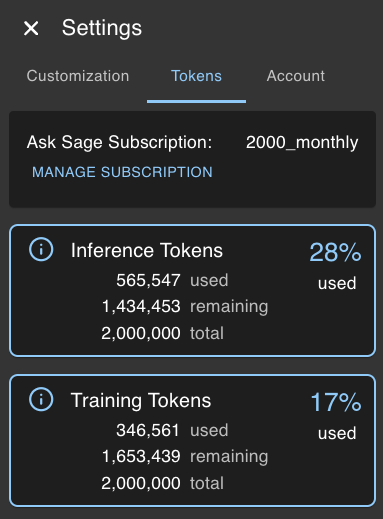
Users can view their token usage and manage their subscription plans through the Tokens menu/settings tab. Here, they can access detailed information about their tokens.
- Subscription: View your current subscription plan
- Inference Tokens: Check the number of inference tokens used and remaining
- Training Tokens: Check the number of training tokens used and remaining
Ask Sage Inference Tokens
Inference Token Usage
Ask Sage Inference Tokens are used to make predictions or inferences using the models available on the platform. These tokens are consumed when users submit prompts, use the plugins/agents to generate responses, or interact with the models in any way that requires processing text data.
Additional Tokens
Users can purchase additional inference tokens if they exceed their allocated limit or require more tokens for their tasks. This flexibility ensures that users can continue to use the platform without interruptions or restrictions.
Ask Sage Training Tokens
Training Token Usage
Ask Sage Training Tokens play a pivotal role for users interested in enhancing their experience with the Retrieval-Augmented Generation (RAG) feature. These tokens are primarily used for creating and populating datasets.
Cost-Effective
Training tokens are priced at an economical rate of $0.80 per 1 million tokens, making it a cost-effective option for your data training endeavors.
Workbooks
Ask Sage Workbooks are similar to datasets, but note that the data sources ingested into a workbook use training tokens for the initial ingestion process. However, once the data is in the workbook, and users perform actions on the data, it will use inference tokens for any subsequent actions.
Token Refill and Subscription Plans
Refill Options
Enterprise Users
If you are on an Enterprise plan and are not an Admin, please contact your Admin for additional tokens. The following information is primarily intended for individual users.
Ask Sage provides users with the option to refill their tokens or upgrade their subscription plans according to their needs. Users can purchase extra tokens or move to a higher subscription tier for increased access.