GitHub MCP
Manage repositories, issues, and pull requests directly from Ask Sage.
Table of Contents
Prerequisites
- Account type: Enterprise account with a minimum of 10M monthly tokens, or a dedicated Ask Sage tenant/instance.
- Activation: Contact your administrator to request hosted MCP access through Ask Sage support at support@asksage.ai.
After we work with you or your administrator to enable the integration, you'll receive confirmation and users can follow the setup steps below.
Connecting Your GitHub Account
The first step is to connect your GitHub account to your Ask Sage profile.
- Open Settings → Integrations: Click your user profile in the bottom-left corner, choose Settings, then select the Integrations tab.
- Connect GitHub: Click Connect next to GitHub.
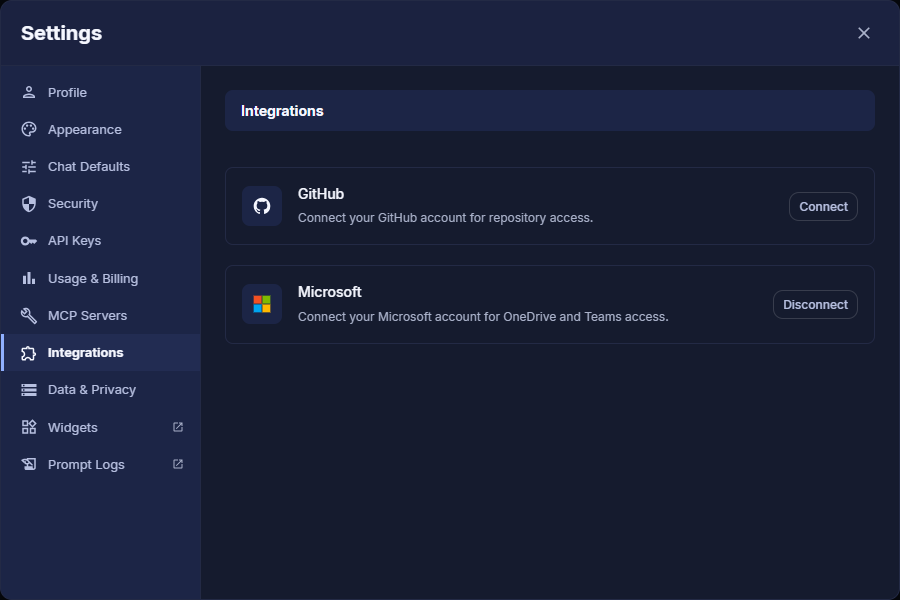
Settings → Integrations
- Authorize: A GitHub authorization window opens. Sign in with your GitHub credentials and click the green Authorize Ask Sage GitHub MCP button to grant the necessary permissions.
- Verify the connection: You are returned to Ask Sage and the GitHub entry now shows Disconnect, confirming you're connected. The MCP Servers tab in Settings also lists Github Mcp as a hosted system server.
Activating and Using the GitHub Tool
Once your account is connected, enable the tool in the chat interface to start using it.
- Open the Tools menu: In the chat window, click the sliders icon at the left of the prompt box to open the Tools menu, then open MCP Tools.
- Enable GitHub MCP: Find Github Mcp in the list and click its toggle. The switch turns blue when active and the entry shows how many of its tools are enabled.
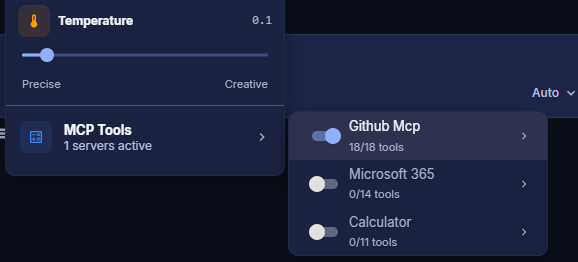
Tool Configuration
- Select a compatible model: Use a model that supports tool integration (MCP). Filter for these by selecting the MCP tag on the model selection screen. Models like GPT-Auto are designed to use these tools automatically.
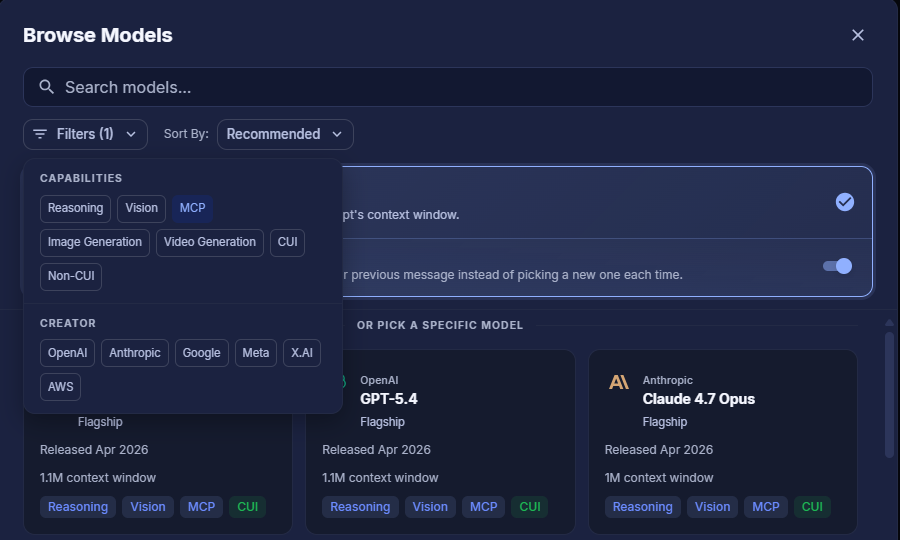
Model Selection with MCP Filter
Making a Request
You can now ask questions or give commands related to your GitHub data.
- Make a request: Type a natural-language command into the chat. For example:
- "List my repositories."
- "Create an issue in the 'frontend' repo titled 'Fix login button bug'."
- "Summarize the latest pull request in the 'backend' project."
- Approve tool usage: For security, Ask Sage prompts you before accessing your data. A Tool Approval Required card appears showing the exact tool and its parameters. Review and click Approve (or Deny).
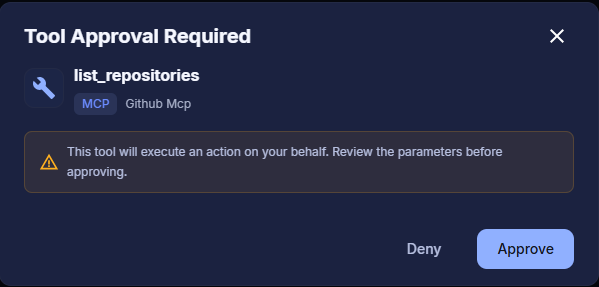
Tool Approval Required
Once approved, Ask Sage executes the task and returns the requested information or confirms the action completed.
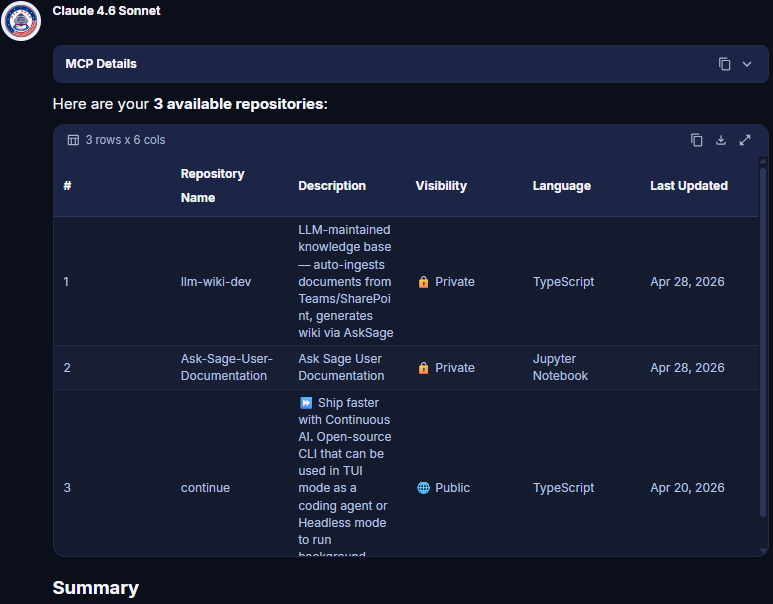
Tool Execution Result
Available Functions
The GitHub tool exposes 19 functions across repositories & files, branches, issues, and pull requests, grouped below. Optional arguments are shown in italics.
Repositories & files
| Function | Arguments | Description |
|---|---|---|
get_user_info | none | Retrieve the authenticated user's GitHub profile. |
list_repositories | (repo_type, sort) | List repositories accessible to the user (all/owner/member, sortable). |
get_repository | repo | Get detailed repository metadata. |
list_repository_contents | repo (ref, recursive) | Retrieve the file tree (recursive by default) using the Git Tree API. |
get_file_content | repo, path (ref) | Download file content with automatic base64 decoding and binary detection. |
create_file | repo, path, message, content (branch) | Create a new file with content and a commit message. |
update_file | repo, path, message, content, branch (sha) | Update an existing file (auto-retrieves SHA if not provided). |
delete_file | repo, path, message (sha, branch) | Delete a file with a commit message. |
Branches
| Function | Arguments | Description |
|---|---|---|
create_branch | repo, branch_name (source_branch, source_sha) | Create a branch from another branch or a specific commit SHA. |
list_branches | repo | List all branches with protection status. |
Issues
| Function | Arguments | Description |
|---|---|---|
create_issue | repo, title (body, labels, assignees) | Create an issue with title, body, labels, and assignees. |
list_issues | repo (state, per_page) | List issues filtered by state (excludes pull requests). |
Pull requests
| Function | Arguments | Description |
|---|---|---|
create_pull_request | repo, title, head, base (body, draft, maintainer_can_modify) | Create a PR with head/base branches, draft support, and cross-repo format. |
list_pull_requests | repo (state, head, base, sort, direction, per_page) | List PRs with filtering, sorting, and pagination. |
get_pull_request | repo, pull_number (include_comments, include_commits) | Get detailed PR info with optional comments, reviews, and commit history. |
update_pull_request | repo, pull_number (title, body, state, base) | Modify a PR's title, body, state, or base branch. |
merge_pull_request | repo, pull_number (commit_title, commit_message, merge_method, sha) | Merge a PR via merge/squash/rebase with optional SHA verification. |
get_pull_request_diff | repo, pull_number (format) | Retrieve a PR's diff or patch content. |
list_pull_request_files | repo, pull_number (per_page) | List all changed files in a PR with diff patches. |