Codex Integration
Bring Ask Sage's AI models directly into your terminal with Codex CLI
About Codex
Bring Ask Sage's AI models directly into your terminal or IDE with OpenAI's official CLI Codex, now integrated with Ask Sage.
Table of Contents
Instance-Specific Base URL: The endpoints and configuration shown reflect the instance at chat.asksage.ai. The api. prefix and path suffix stay the same across deployments — only the instance segment in the middle changes based on which Ask Sage instance you are logging into. Always use the instance approved by your organization and applicable regulatory requirements, and match the base URL in your configuration to the instance you authenticate against.
Prerequisites
Before you begin, ensure you have the following:
~/.codex/config.toml, so this page configures it too — including the Work mode. See ChatGPT Work for what that means for each mode in the app. Installation
Codex can be installed in three ways:
Option 1: VSCode Extension
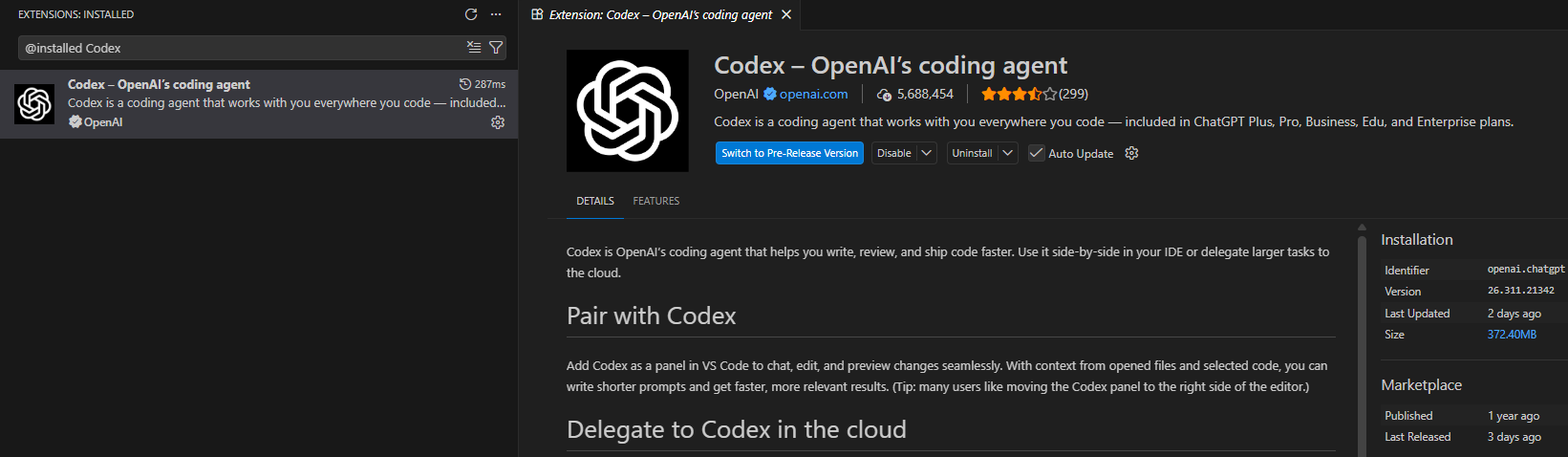
Install the Codex extension directly in Visual Studio Code:
Open VSCode and navigate to the Extensions view (Ctrl+Shift+X or Cmd+Shift+X on Mac)
Search for "Codex-OpenAI's coding agent" by OpenAI
Click the Install button to add the extension to your VSCode
Option 2: CLI Installation
The standalone installer is the recommended method — it self-updates.
# Standalone installer (recommended)
curl -fsSL https://chatgpt.com/codex/install.sh | sh

# Homebrew — note the --cask flag
brew install --cask codex

# npm
npm i -g @openai/codex

# Verify
codex --versionbrew install codexwithout--caskinstalls something else entirely. Codex is distributed as a Homebrew cask (a prebuilt binary), not a formula, and the bare name resolves to an unrelated formula.- The npm package is
@openai/codex, notcodex. The unscopedcodexpackage is an unrelated old package. If you installed it by mistake, runnpm uninstall -g codexfirst. - Do not mix install methods. Having two Codex installs on one machine is the most common cause of version confusion and
command not foundPATH conflicts. Pick one and update with that same method.
Option 3: ChatGPT desktop app
The ChatGPT desktop app (macOS, Windows, Linux) bundles Codex and drives it through its own copy of the CLI. Select Codex from the mode dropdown. Because it reads the same ~/.codex/config.toml, the configuration below applies to it without any extra steps — see ChatGPT Work.
Configuration Methods
Configure Ask Sage as the model provider in ~/.codex/config.toml. If the config.toml file doesn't exist, create it. Choose one of the two options below.
The example configs below disable Codex update checks to reduce outbound requests. If your environment allows update checks, you can set check_for_update_on_startup = true.
Option 1: API Key in the Config File (Recommended)
Put your Ask Sage API key directly into the config file, passed as the x-access-tokens header:
# Core Model Selection
model = "gpt-6-astra"
model_provider = "asksage"

# Disable update checks to avoid unnecessary outbound requests.
check_for_update_on_startup = false

# Disable Web Search (Sends Queries Externally)
# "cached" (default) serves results from the web search cache.
# "live" fetches the most recent data from the web (same as --search).
# "disabled" turns off the web search tool.
web_search = "disabled"

# Approval & Sandbox
approval_policy = "on-request"
allow_login_shell = true
sandbox_mode = "read-only"
model_reasoning_effort = "medium"

# Model Provider — Ask Sage Passthrough
[model_providers.asksage]
name = "AskSage Passthrough"
base_url = "https://api.asksage.ai/server/openai/v1"
wire_api = "responses"
http_headers = { "x-access-tokens" = "your-api-key" }

# Features
[features]
multi_agent = true
runtime_metrics = false
apps = false
apps_mcp_gateway = false
responses_websockets = false
responses_websockets_v2 = false

# Sandbox Settings — No Network from Sandbox
[sandbox_workspace_write]
writable_roots = []
network_access = false
exclude_tmpdir_env_var = false
exclude_slash_tmp = false

# Network Permissions — Locked to Ask Sage API Only
[permissions.network]
enabled = true
mode = "limited"
allowed_domains = ["api.asksage.ai"]
denied_domains = ["statsig.com", "statsigapi.net", "featuregates.org", "api.openai.com"]
allow_local_binding = false
dangerously_allow_non_loopback_proxy = false
dangerously_allow_non_loopback_admin = false
dangerously_allow_all_unix_sockets = false

# Shell Environment Policy
[shell_environment_policy]
inherit = "all"
ignore_default_excludes = false
exclude = []
set = {}
include_only = []
experimental_use_profile = false

# History — Disabled for Classified Environments
[history]
persistence = "none"

# TUI
[tui]
notifications = false
animations = true
show_tooltips = true

# Analytics — Disabled
[analytics]
enabled = false

# Feedback — Disabled
[feedback]
enabled = false

# OpenTelemetry — Disabled
[otel]
log_user_prompt = false
environment = "production"
exporter = "none"
trace_exporter = "none"
metrics_exporter = "none"

# Notices — Suppress All
[notice]
hide_full_access_warning = true
hide_world_writable_warning = true
hide_rate_limit_model_nudge = true

# MCP Servers
[mcp_servers]

# Profiles
[profiles]

# Projects
[projects]

# Tools
[tools]

# Windows
[windows]
sandbox = "unelevated"model: The model to use (e.g.,gpt-5.4forCommercial,gpt-5.4-govforGovernmenttenants)base_url: Your Ask Sage Server Base URL with/server/openai/v1path. Note this varies based on the instance of Ask Sage you are using. Please verify this Base URL when you Create your API Key, the corresponding Base URL will be underneath.http_headers: Contains your Ask Sage API key via thex-access-tokensheaderwire_api: Must be"responses". Codex removed Chat Completions support in February 2026, so"chat"no longer works — older guides recommending it are out of date. It is also the default now, so omitting the key entirely is equivalent.
~/.codex/config.toml. Codex also reads a project-level .codex/config.toml from trusted repositories, but it deliberately ignores provider and auth keys there. That is a security boundary, not a parse error: it stops a repository you check out from redirecting your credentials and model traffic to somewhere else. If you put the Ask Sage provider block in a project file, it will be silently skipped. Option 2: Environment Variable (terminal use only)
codex run from the terminal where you ran export will work, while a launch from the Dock, Start menu, or VS Code sees no key and fails to authenticate — which looks like a broken key rather than a missing one. If you need this option to cover GUI launches, set the variable at the OS level instead: setx on Windows, or launchctl setenv plus a LaunchAgent on macOS. Use an environment variable for your API key instead of putting it in the file. You will need to run the export command in each new terminal before running codex:
export ASKSAGE_API_KEY="your-API-Key"Then use this ~/.codex/config.toml:
# Core Model Selection
model = "gpt-6-astra"
model_provider = "asksage"

# Disable update checks to avoid unnecessary outbound requests.
check_for_update_on_startup = false

# Disable Web Search (Sends Queries Externally)
# "cached" (default) serves results from the web search cache.
# "live" fetches the most recent data from the web (same as --search).
# "disabled" turns off the web search tool.
web_search = "disabled"

# Approval & Sandbox
approval_policy = "on-request"
allow_login_shell = true
sandbox_mode = "read-only"
model_reasoning_effort = "medium"

# Model Provider — Ask Sage Passthrough
[model_providers.asksage]
name = "AskSage Passthrough"
base_url = "https://api.asksage.ai/server/openai/v1"
wire_api = "responses"
env_key = "ASKSAGE_API_KEY"

# Features
[features]
multi_agent = true
runtime_metrics = false
apps = false
apps_mcp_gateway = false
responses_websockets = false
responses_websockets_v2 = false

# Sandbox Settings — No Network from Sandbox
[sandbox_workspace_write]
writable_roots = []
network_access = false
exclude_tmpdir_env_var = false
exclude_slash_tmp = false

# Network Permissions — Locked to Ask Sage API Only
[permissions.network]
enabled = true
mode = "limited"
allowed_domains = ["api.asksage.ai"]
denied_domains = ["statsig.com", "statsigapi.net", "featuregates.org", "api.openai.com"]
allow_local_binding = false
dangerously_allow_non_loopback_proxy = false
dangerously_allow_non_loopback_admin = false
dangerously_allow_all_unix_sockets = false

# Shell Environment Policy
[shell_environment_policy]
inherit = "all"
ignore_default_excludes = false
exclude = []
set = {}
include_only = []
experimental_use_profile = false

# History — Disabled for Classified Environments
[history]
persistence = "none"

# TUI
[tui]
notifications = false
animations = true
show_tooltips = true

# Analytics — Disabled
[analytics]
enabled = false

# Feedback — Disabled
[feedback]
enabled = false

# OpenTelemetry — Disabled
[otel]
log_user_prompt = false
environment = "production"
exporter = "none"
trace_exporter = "none"
metrics_exporter = "none"

# Notices — Suppress All
[notice]
hide_full_access_warning = true
hide_world_writable_warning = true
hide_rate_limit_model_nudge = true

# MCP Servers
[mcp_servers]

# Profiles
[profiles]

# Projects
[projects]

# Tools
[tools]

# Windows
[windows]
sandbox = "unelevated"DoD/DoW Network Configuration (In Development)
Prerequisites
You'll need a DoD root certificate in PEM format. If you haven't already created this file, see the DoD Certificate Setup guide for instructions.
Configuration for VSCode Extension
Add the following to your VSCode config.toml:
# Core Model Selection
model = "gpt-5.4-gov"
model_provider = "asksage"

# Disable update checks to avoid unnecessary outbound requests.
check_for_update_on_startup = false

# Disable Web Search (Sends Queries Externally)
# "cached" (default) serves results from the web search cache.
# "live" fetches the most recent data from the web (same as --search).
# "disabled" turns off the web search tool.
web_search = "disabled"

# Approval & Sandbox
approval_policy = "on-request"
allow_login_shell = true
sandbox_mode = "read-only"
model_reasoning_effort = "medium"

# Model Provider — Ask Sage Passthrough (Azure Government OpenAI)
[model_providers.asksage]
name = "AskSage Passthrough"
base_url = "https://api.genai.army.mil/server/openai/v1"
wire_api = "responses"
http_headers = { "x-access-tokens" = "your-api-key" }

[model_providers.asksage.tls]
ca-certificate = "C:\\ProgramData\\ssl\\certs\\DoD_CAs.pem"

# Features
[features]
multi_agent = true
runtime_metrics = false
apps = false
apps_mcp_gateway = false
responses_websockets = false
responses_websockets_v2 = false

# Sandbox Settings — No Network from Sandbox
[sandbox_workspace_write]
writable_roots = []
network_access = false
exclude_tmpdir_env_var = false
exclude_slash_tmp = false

# Network Permissions — Locked to Ask Sage API Only
[permissions.network]
enabled = true
mode = "limited"
allowed_domains = ["api.genai.army.mil"]
denied_domains = ["statsig.com", "statsigapi.net", "featuregates.org", "api.openai.com"]
allow_local_binding = false
dangerously_allow_non_loopback_proxy = false
dangerously_allow_non_loopback_admin = false
dangerously_allow_all_unix_sockets = false

# Shell Environment Policy
[shell_environment_policy]
inherit = "all"
ignore_default_excludes = false
exclude = []
set = {}
include_only = []
experimental_use_profile = false

# History — Disabled for Classified Environments
[history]
persistence = "none"

# TUI
[tui]
notifications = false
animations = true
show_tooltips = true

# Analytics — Disabled
[analytics]
enabled = false

# Feedback — Disabled
[feedback]
enabled = false

# OpenTelemetry — Disabled
[otel]
log_user_prompt = false
environment = "production"
exporter = "none"
trace_exporter = "none"
metrics_exporter = "none"

# Notices — Suppress All
[notice]
hide_full_access_warning = true
hide_world_writable_warning = true
hide_rate_limit_model_nudge = true

# MCP Servers
[mcp_servers]

# Profiles
[profiles]

# Projects
[projects]

# Tools
[tools]

# Windows
[windows]
sandbox = "unelevated"- Replace
C:\\ProgramData\\ssl\\certs\\DoD_CAs.pemwith your actual certificate path - Use double backslashes (
\\) in Windows paths for TOML - Replace
your-api-keywith your actual Ask Sage API Key - For Army GenAI environment, update the
base_urlto your tenant's endpoint - You can reuse the same PEM file across other Ask Sage integrations
Linux/Mac users: Use forward slashes in paths: /path/to/AskSage_DoD_Root.pem
Option 2: Environment Variable
Use an environment variable for your API key instead of hard-coding it. You will need to run the export command each time you open a new terminal before running codex:
export ASKSAGE_API_KEY="your-API-Key"Then use this ~/.codex/config.toml:
# Core Model Selection
model = "gpt-5.4-gov"
model_provider = "asksage"

# Disable update checks to avoid unnecessary outbound requests.
check_for_update_on_startup = false

# Disable Web Search (Sends Queries Externally)
# "cached" (default) serves results from the web search cache.
# "live" fetches the most recent data from the web (same as --search).
# "disabled" turns off the web search tool.
web_search = "disabled"

# Approval & Sandbox
approval_policy = "on-request"
allow_login_shell = true
sandbox_mode = "read-only"
model_reasoning_effort = "medium"

# Model Provider — Ask Sage Passthrough (Azure Government OpenAI)
[model_providers.asksage]
name = "AskSage Passthrough"
base_url = "https://api.genai.army.mil/server/openai/v1"
wire_api = "responses"
env_key = "ASKSAGE_API_KEY"

[model_providers.asksage.tls]
ca-certificate = "C:\\ProgramData\\ssl\\certs\\DoD_CAs.pem"

# Features
[features]
multi_agent = true
runtime_metrics = false
apps = false
apps_mcp_gateway = false
responses_websockets = false
responses_websockets_v2 = false

# Sandbox Settings — No Network from Sandbox
[sandbox_workspace_write]
writable_roots = []
network_access = false
exclude_tmpdir_env_var = false
exclude_slash_tmp = false

# Network Permissions — Locked to Ask Sage API Only
[permissions.network]
enabled = true
mode = "limited"
allowed_domains = ["api.genai.army.mil"]
denied_domains = ["statsig.com", "statsigapi.net", "featuregates.org", "api.openai.com"]
allow_local_binding = false
dangerously_allow_non_loopback_proxy = false
dangerously_allow_non_loopback_admin = false
dangerously_allow_all_unix_sockets = false

# Shell Environment Policy
[shell_environment_policy]
inherit = "all"
ignore_default_excludes = false
exclude = []
set = {}
include_only = []
experimental_use_profile = false

# History — Disabled for Classified Environments
[history]
persistence = "none"

# TUI
[tui]
notifications = false
animations = true
show_tooltips = true

# Analytics — Disabled
[analytics]
enabled = false

# Feedback — Disabled
[feedback]
enabled = false

# OpenTelemetry — Disabled
[otel]
log_user_prompt = false
environment = "production"
exporter = "none"
trace_exporter = "none"
metrics_exporter = "none"

# Notices — Suppress All
[notice]
hide_full_access_warning = true
hide_world_writable_warning = true
hide_rate_limit_model_nudge = true

# MCP Servers
[mcp_servers]

# Profiles
[profiles]

# Projects
[projects]

# Tools
[tools]

# Windows
[windows]
sandbox = "unelevated"
Recommended Models
Discover exactly what your instance offers
The authoritative list for your deployment is the model-list endpoint. It needs no credential, so it confirms the host and base URL are reachable — but it does not test your key:
# Reachability + model list (no credential required)
curl -s https://api.asksage.ai/server/openai/v1/models | jq '.data[].id'

# Credential test — the only way to verify a key is a real call
curl -s -X POST https://api.asksage.ai/server/openai/v1/responses \
  -H "Content-Type: application/json" \
  -H "x-access-tokens: $ASKSAGE_API_KEY" \
  -d '{"model":"gpt-6-astra","input":"reply with OK","max_output_tokens":16}'
Commonly used entries from that list:
| Model | Notes |
|---|---|
gpt-6-astra | Current flagship — strongest for agentic and software-engineering work |
gpt-5.6-sol · gpt-5.6-terra · gpt-5.6-luna | GPT-5.6 family, commercial |
gpt-5.6-sol-gov · gpt-5.6-terra-gov · gpt-5.6-luna-gov | GPT-5.6 family, government tenants |
gpt-5.5 · gpt-5.4 · gpt-5.4-gov | Previous generation, still available |
gpt-5.4-sec | Security-focused variant |
gpt-4.1 · gpt-4.1-gov · gpt-4.1-mini · gpt-4.1-nano | Cheaper, lower-latency options |
gpt-o3 · gpt-o3-mini · gpt-o3-mini-gov · gpt-o4-mini | O-series reasoning models |
{"response":"Token is invalid [1]","status":400} with an HTTP status of 200. Check the body, not the exit status — and note this is exactly why a bad key shows up in Codex as the vague "stream disconnected before completion" message rather than an obvious auth error. If you see the message "Model metadata for <MODEL NAME> not found. Defaulting to fallback metadata; this can degrade performance and cause issues." in the terminal, Codex will usually continue to work, but some behavior may be degraded. If you notice tool issues or poor performance, switch to one of the recommended models above or contact support.
Troubleshooting
This is a generic error message indicating something is not configured correctly.
Solutions:
- Verify your API key is correct and not missing
- Ensure you are using a model your account has access to
- Double-check the
base_urlin yourconfig.toml - If using Option 2, confirm you exported
ASKSAGE_API_KEYin the same terminal session
Solutions:
- Verify your Ask Sage API Key is valid
- Remove any extra spaces from the API key string
- Confirm the
x-access-tokensheader (Option 1) orenv_key(Option 2) is correctly configured
Solutions:
- Verify the
base_urlis correct and accessible - Ensure there are no firewall rules blocking the connection
- Check your network connectivity