Sub-Organizations
Divide an organization into teams, control who manages them, and control where their tokens come from
Table of Contents
A sub-organization is a group of users inside an organization. An administrator uses sub-organizations to divide an organization into smaller units, for example a team, a department, or a program. Each sub-organization has its own member list and its own token funding setting.
The user interface uses two names for this feature: Sub-Organization and the short form Sub-Org. These pages use “sub-organization” in the text and the exact screen label in the procedures.
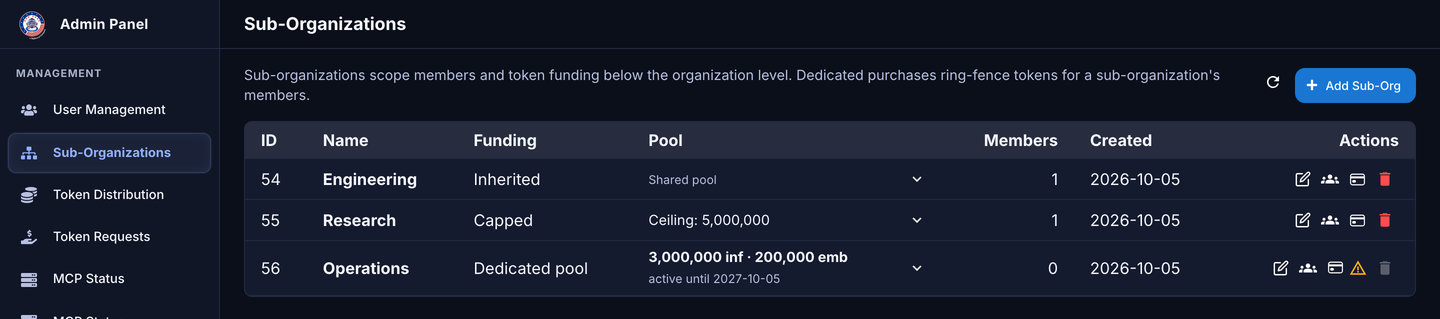
The Sub-Organizations console
In this section
| Page | Content |
|---|---|
| Create and Manage | Open the console, create and edit a sub-organization, add members, and assign users from User Management. |
| Members and Roles | Account types, capability roles, and the Sub-Org Admin account type. |
| Token Funding | Token types, pools, ceilings, dedicated pools, and token requests. |
| Admin Views and Removal | The Admin and Sub-Org Admin views, removing members, and deleting a sub-organization. |
Rules
The system applies these rules to every sub-organization:
- A sub-organization is always one level below its organization. The default configuration does not permit a sub-organization inside another sub-organization.
- A user can be a member of one sub-organization at a time.
- A user who is not in a sub-organization stays at the organization level. For that user, nothing changes.
- When you add a user who is already in a different sub-organization, the system moves the user. The user leaves the previous sub-organization.
- The users in a sub-organization must already belong to its parent organization.
- Two sub-organizations in the same organization cannot have the same name. The comparison ignores uppercase and lowercase.
- When a user joins or leaves a sub-organization, the system checks the monthly token limits of that user against the new pool. If a limit is too high for the new pool, the system decreases it. The system never increases a limit. See Token Funding.
Terms
| Term | Meaning |
|---|---|
| Organization | The top-level customer account. It owns the users and the organization pool. |
| Parent organization | The organization that contains a sub-organization. |
| Sub-organization | A named group of users inside an organization. |
| Member | A user who belongs to a sub-organization. |
| Funding | The setting that controls where the tokens for a sub-organization come from. |
| Pool | The purchased tokens that a user uses. A pool is the organization pool or a dedicated pool. |
| Purchase | A recorded number of tokens, with a start date and an expiration date. Purchases make a pool. |
| Monthly token limit | The maximum number of tokens that one user can use in one calendar month. Each user has a limit for inference tokens and a limit for embedding tokens. |
| Inherited | Funding type. Members use the organization pool. The sub-organization has no ceiling. |
| Capped | Funding type. Members use the organization pool. The sub-organization has a ceiling. |
| Dedicated pool | Funding type. The sub-organization has its own purchased tokens. Only its members can use them. |
| Ceiling | A number that an administrator sets on a Capped sub-organization. It sets a maximum for the total of the monthly token limits. It does not stop a prompt. See What the ceiling does. |
Who can do what
A Superadmin opens the Sub-Organizations console from the Organizations page. An Admin opens it from the Sub-Organizations item in the admin sidebar. A Sub-Org Admin sees only their own sub-organization. The procedures show the screens of a Superadmin. An Admin can do the same procedures.
| Task | Who can do it | Page |
|---|---|---|
| Open the Sub-Organizations console | Superadmin, Admin, Sub-Org Admin | Create and Manage |
| Create a sub-organization | Superadmin, Admin | Create and Manage |
| Edit a sub-organization | Superadmin, Admin | Create and Manage |
| Add members | Superadmin, Admin | Create and Manage |
| Remove a member | Superadmin, Admin, Sub-Org Admin (standard users only) | Admin Views and Removal |
| Change a capability role | Superadmin, Admin, Sub-Org Admin (standard users only) | Members and Roles |
| Give or remove Sub-Org Admin | Superadmin, Admin | Members and Roles |
| Record or edit a dedicated purchase | Superadmin, Admin | Token Funding |
| Approve or deny a token request | Superadmin, Admin, User Manager (if the deployment enables User Manager access) | Token Funding |
| Delete a sub-organization | Superadmin, Admin | Admin Views and Removal |
No administrator can change their own role, their own account type, or their own sub-organization.
Messages for administrators
| Message | Cause | Page |
|---|---|---|
| Name is required. | The Name field is empty. | Create and Manage |
| A record with this name already exists | Another sub-organization in the organization has the same name. | Create and Manage |
| You cannot change your own sub-organization assignment. Another administrator must do it. | You typed your own email address. | Create and Manage |
| Assign a sub-org first | The user is not in a sub-organization, so you cannot give the Sub-Org Admin account type. | Members and Roles |
| Approval would exceed the pool. | The new total of the monthly inference limits is more than the pool or the ceiling. | Token Funding |
| This sub-organization has dedicated funding, so it can’t be deleted. | The sub-organization has a dedicated purchase. An expired purchase also counts. | Admin Views and Removal |
| Delete the sub-organizations beneath this one first. | A sub-organization is below this sub-organization. | Admin Views and Removal |
| Remove administrative roles from this team’s members before deleting it | A member has an administrator account type. | Admin Views and Removal |